
MotionCam Pro revolutionizes mobile photography and videography by offering professional-grade tools directly on your smartphone. The app's standout feature is its ability to capture RAW video, a first for smartphone cameras. This allows videographers and photographers to retain maximum detail and flexibility during post-processing.
In addition to its groundbreaking video capabilities, MotionCam Pro enhances still photography through advanced computational algorithms. These replace standard camera software, enabling users to produce stunning images with improved dynamic range, color accuracy, and low-light performance. Whether you're a professional photographer or an enthusiast, MotionCam Pro provides the tools needed to elevate your mobile photography experience.
MotionCam Pro stands out with its unique combination of features tailored for both videographers and photographers. The app's hallmark is its RAW video capture capability, which preserves all image data from the sensor, allowing for unparalleled editing flexibility. This feature alone makes it indispensable for professionals who demand the highest quality in their work.
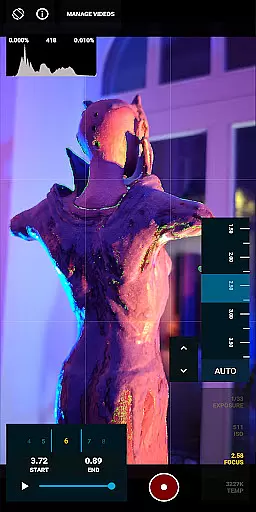
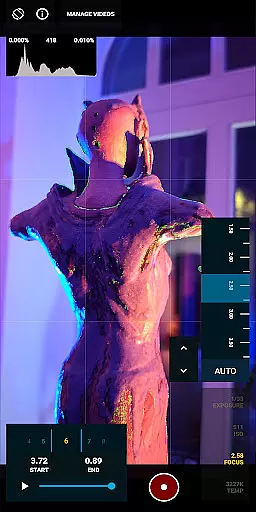
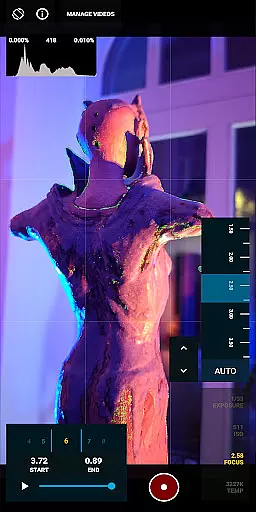
For still photography, MotionCam Pro employs sophisticated computational photography techniques. These algorithms process multiple frames simultaneously to create images with exceptional clarity, reduced noise, and accurate colors. Users can also benefit from manual controls for exposure, focus, and white balance, giving them complete creative control over their shots.
The app further enhances user experience by integrating with the MotionCam Community, accessible via Discord. Here, users can share tips, showcase their work, and collaborate with like-minded individuals, fostering a supportive environment for creative growth.
MotionCam Pro revolutionizes mobile photography by offering real-time capture and preview capabilities. This feature is crucial for photographers who need to see the exact image they are capturing without any delay.
The app achieves this through advanced computational photography algorithms that process images instantly. Users can view their shots in real-time, ensuring they capture the perfect moment every time.
With MotionCam Pro, users benefit from a seamless experience where what they see on the screen is exactly what they get in the final image. This eliminates guesswork and enhances the overall photography experience.
This real-time functionality not only improves photo quality but also saves time during post-processing, as images come out nearly perfected right from the start.
MotionCam Pro incorporates AI-driven beauty and enhancement features that maintain naturalness in photos. Unlike other apps that may over-process images, MotionCam ensures enhancements look genuine and lifelike.
The AI technology intelligently identifies facial features and applies subtle adjustments that enhance beauty without altering the subject's natural appearance. This includes skin smoothing, eye enhancement, and teeth whitening, all done with precision.
Users appreciate the balance between enhancement and authenticity, allowing them to produce stunning yet realistic photographs. The appu2019s ability to preserve natural textures sets it apart from competitors.
By prioritizing natural beauty, MotionCam Pro empowers users to create professional-quality images that retain the subject's true essence, making it an invaluable tool for both amateur and professional photographers.
RAW video capture
Advanced photo algorithms
Manual camera controls
Vibrant community support
Professional-grade tools
Premium pricing model
Steep learning curve
Limited device compatibility
High storage requirements
Battery-intensive usage

Gallery show photo, video, slideshow, is perfect 3D effect private photo albums.
 4.80
4.80
[3DSteroid Pro] is a stereoscopic application for Android.
4.30
All-in-One Editor & AI Photo Enhancer, Collage, Cartoonify, Funny Stickers & BGS
4.10
Perfect body tune & face app - photo retouch, makeup, slim body & beautify face.
4.80
Create collages easily! Nice pic collage maker & background eraser for Instagram
4.50
Over 800 film simulation recipes for Fujifilm. Black Friday Offer!
4.3
A light meter for true photographers.
4.20
Enhance, upscale, and transform your images — on your device, without limits
4.70
Discover & download millions of art for The Frame TV or Hisense CanvasTV
4.60
Pro version: AR sun/moon tracker for any date. Tool for photographers & planners
4.90
Easily create custom gifts, cards, photo books & more on the Shutterfly app!
4.60
HD Camera Pro with HD Video shooting, Panorama, Photo editor , Beauty Camera.
4.50
Edit like a pro with Hypic. Apply filters, AI effects, & magic touch.
4.40
Future baby face generator: AI kids generator, kid face! What my baby look like?
4.40
Gallery Slideshow is slideshow maker app for slideshow from your gallery photos.
3.90
USB Storage Access for Photos, Videos, Music and Documents
3.80
Hair color changer, AI haircut app, fun hair editor and buzz cut filter for all!
3.80
Long exposure camera with computational photography
2.60
Add a dreamy vibe to your selfies and videos with soft style filters
4.1





User Reviews