
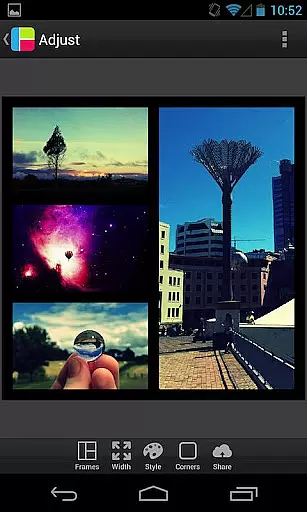
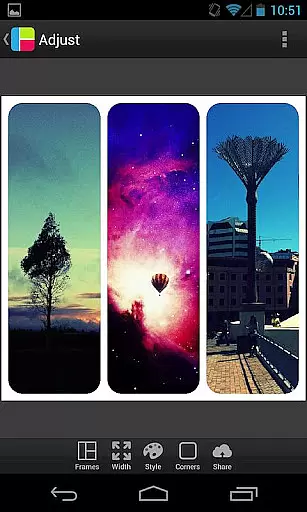
PicFrame is a versatile photography app that allows users to create stunning photo collages by combining multiple images into customizable frames. With 36 adjustable frame layouts, users can include up to five photos in a single frame, offering endless creative possibilities. The app provides advanced editing tools such as rounded corners, shape customization, and precise control over borders, colors, and patterns.
Designed for both casual users and photography enthusiasts, PicFrame supports various aspect ratios including square format, making it ideal for social media sharing. Its intuitive interface lets users zoom, rotate, and adjust brightness, contrast, and saturation of each photo individually. Whether you're looking to preserve memories or enhance your social media posts, PicFrame delivers professional-quality results with ease.
PicFrame stands out with its extensive set of features tailored for creative photo editing. The app offers 36 fully adjustable frames, allowing users to customize layouts by dragging inner borders for unique designs. Advanced options like rounded corners, shape transformations (circle, heart, hexagon), and precise border width adjustments provide complete creative control.
The app includes a user-friendly color picker for border customization and 52 background patterns to enhance visual appeal. Users can fine-tune each photo's brightness, contrast, and saturation while maintaining the ability to rotate and zoom using pinch gestures. Supporting multiple aspect ratios and high-resolution outputs, PicFrame ensures compatibility across various platforms, from Instagram to Facebook, delivering professional-grade collages directly to your device.
Real-time capture and preview functionality is essential for photography apps as it allows users to see exactly what the final image will look like before taking a photo. PicFrame offers this feature by enabling users to adjust various settings such as brightness, contrast, and saturation in real time.
The app provides an intuitive interface where users can pinch to zoom and drag to move photos within frames, ensuring precise placement and composition. This immediate feedback loop enhances the creative process, allowing photographers to fine-tune their images on the fly.
With PicFrame's real-time adjustments, users can experiment with different effects and instantly see the results, leading to more informed decisions about their photo edits. This capability not only saves time but also elevates the overall quality of the framed photos.
AI beauty and enhancement features are becoming increasingly popular in photography apps, offering tools that automatically improve image quality while maintaining a natural look. PicFrame includes several AI-driven enhancements that help users achieve professional-grade results without extensive editing knowledge.
One standout feature is the appu2019s ability to change the shape of photos into various forms like circles, hearts, or hexagons. Additionally, the easy-to-use color picker allows for seamless border color adjustments, adding a personalized touch to each frame.
PicFrame also offers 52 background patterns and adjustable photo effects, which contribute to creating unique and visually appealing compositions. These AI-powered tools ensure that every photo looks its best, striking a balance between enhanced aesthetics and natural appearance.
User-friendly interface
Extensive customization options
High-quality output resolution
Versatile frame designs
Excellent social media integration
Limited to five photos per frame
No automatic enhancement feature
Some features may feel complex to beginners
Occasional performance lags
Ads in the free version

Cut and paste photo editor & eraser to customize photos easy and swap faces fun
 4.50
4.50
Virtual makeup, hair filters & body tuner—edit from face to full body!
4.20
Be your best in every shot! Fix, edit and retouch your face in selfies & photos.
3.70
A must-have app for landscape photographers
4.60
Gallery Slideshow is slideshow maker app for slideshow from your gallery photos.
3.90
AI photo enhancer with Sora 2! Enhance, descratch, and colorize your old photos.
4.50
Hair color changer, AI haircut app, fun hair editor and buzz cut filter for all!
3.80
Enhance, upscale, and transform your images — on your device, without limits
4.70
Remote control the phone camera shutter from your smartwatch and take a picture
1.60
Pro version: AR sun/moon tracker for any date. Tool for photographers & planners
4.90
Create funny photos and videos with the popular Time Warp Scan filter.
4.90
Perfect body tune & face app - photo retouch, makeup, slim body & beautify face.
4.80
Photo editor: AI filters, photo enhancer, pic collage maker, AI art generator.
4.80
A collection of tools and reference tables for DPs, ACs, DITs and Operators.
4.70
Android Native system HD camera app. Never been so simple and faster.
4.70
Cartoon and artistic effects for your photos and videos
4.70
Effortlessly organize, view and share your photos & videos with Gallery app!
4.40
Easily stitch panoramas from multiple photos or video.
4.40
RAW video capture with advanced controls
4.40




User Reviews