
Neon Clock Wallpaper is a dynamic personalization app that allows users to design and customize unique clock wallpapers for both home screens and lock screens. The app provides diverse pre-made templates alongside powerful customization features, enabling users to express their individual styles through creative clock designs.
With its intuitive interface, users can easily adjust colors, sizes, and styles while incorporating stunning neon effects. Whether you're looking to create artistic digital clocks or vibrant analog displays, this app caters to all preferences. Its ability to transform any smartphone into a personalized timepiece makes it an ideal choice for those seeking aesthetic enhancement and functionality.
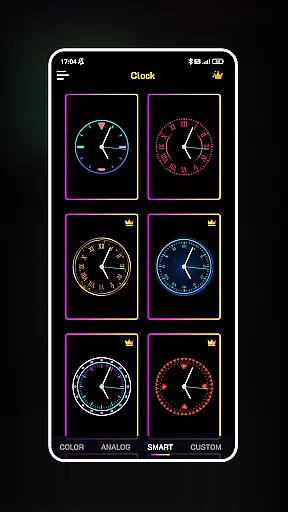
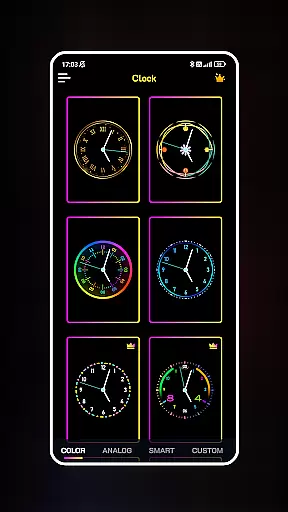
Neon Clock Wallpaper stands out with its robust feature set tailored for creativity and personal expression. One of the key highlights is the wide selection of pre-designed clock templates, each offering distinct designs and color schemes. These templates serve as excellent starting points for users who want quick yet stylish results.
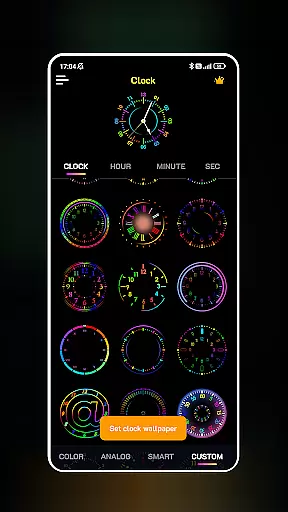
For more advanced customization, the app offers tools to build entirely new clocks from scratch. Users can combine various components such as hands, numbers, and backgrounds, fine-tuning every detail including size, style, and lighting effects. The inclusion of vivid neon effects adds a modern touch, making each creation visually striking. Additionally, seamless integration with both wallpaper and lock screen settings ensures maximum usability across devices.
Customization is at the heart of Neon Clock Wallpaper, allowing users to express their unique style through diverse clock designs. The app offers a wide array of pre-made templates that cater to different tastes, ensuring that everyone can find something that resonates with their personal aesthetic.
Beyond the selection of templates, users have the freedom to create custom clocks from scratch. This involves choosing individual components and adjusting colors, sizes, and styles, which provides an almost limitless potential for personal expression. Whether you prefer minimalist designs or vibrant neon effects, the app accommodates all preferences.
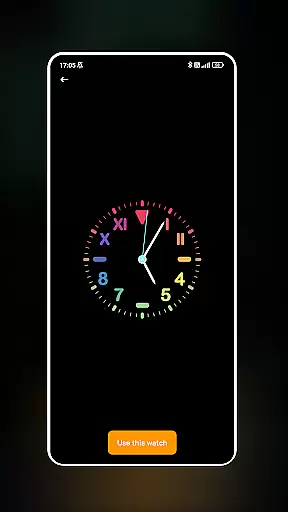
The ability to customize extends to the functionality of setting your crafted clock as both wallpaper and lock screen. This feature ensures that your personalized design is not just a fleeting choice but a constant reflection of your personality on your device. With such extensive customization options, Neon Clock Wallpaper empowers users to transform their screens into unique works of art.
Theme compatibility is a crucial aspect of any personalization app, and Neon Clock Wallpaper excels in this area by ensuring its clocks integrate seamlessly with various device themes. Regardless of whether your device sports a light or dark theme, the clocks maintain their visual appeal without compromising readability or aesthetics.
The app's compatibility goes beyond just adapting to existing themes; it enhances them by adding a layer of personalization that aligns with the system's look and feel. This means that when you switch between different themes on your device, your customized clock will remain visually consistent and complementary.
Moreover, the vibrant neon effects are designed to be theme-aware, adjusting their brightness and contrast to ensure they stand out while still harmonizing with the overall interface. This attention to detail in theme compatibility makes Neon Clock Wallpaper a versatile tool for personalization, suitable for any user looking to enhance their deviceu2019s appearance with a unique timepiece.
User-friendly interface
Vibrant neon effects
Customizable templates
Wide design variety
Quick setup process
Limited free options
High battery usage
Premium feature cost
Occasional glitches
Ads in free version

Customizable Glass widgets. Over 360+ stunning widgets and more!
 4.70
4.70
Ultra realistic gold analog watch face with lots of customization options.
4.50
Turn text & photos into stunning AI videos, art, and creative visual stories.
4.50
350+ widgets with a premium glass-style finish, perfect for home & lock screens.
4.70
Create unique, fun emojis with Funny Emoji Maker! Unlimited creativity!
4.00
Enjoy a variety of amazing live wallpapers and colorful EDGE lighting borders!
4.80
set a new experience for the Android mobile phone
4.20
Your home screen, just the way you like it.
3.80
Transform your phone with stylish zipper lock themes and 4D live wallpaper
4.10
Only for Wear OS devices!
4.90
Gun Chase - Let the chase begin.
4.80
Embrace the Night. Unleash the power of darkness with Raven Dark Icon Pack
4.60
Choose your keyboard with RGB colors effect, themes, fonts, emojis.
4.60
Handcrafted pixel art icons, widgets & wallpapers
4.60
Transform your phone with Launcher iOS 26 - Smooth & elegant iOS experience
4.50 4.50
4.50 4.10
4.10
Ultimate widget creator. Design custom widgets for a truly unique home screen!
3.90
Modern Glass Icon Pack with glossy icons, clean minimal theme & aesthetic style
4.0



User Reviews