
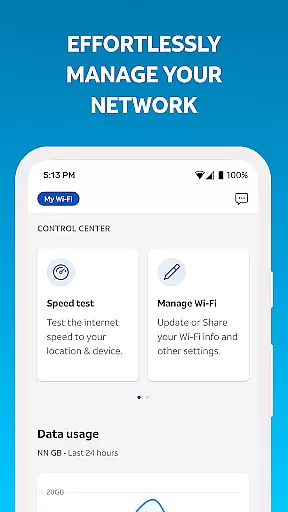
Smart Home Manager is a productivity-focused application designed to simplify the management of your AT&T Internet service. The app provides an intuitive interface for users to set up and manage their home network with ease. With technician-free troubleshooting, it allows you to resolve issues without external help.
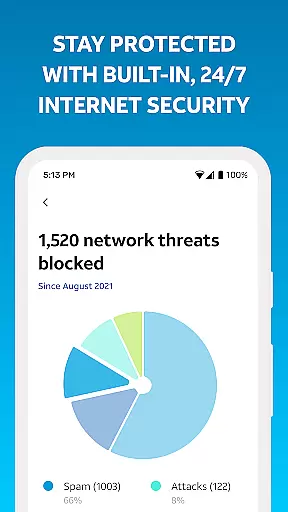
Key features include the ability to view and update Wi-Fi settings, monitor connected devices, personalize device names, and control family screen time through customizable profiles. Additionally, users can pause Wi-Fi access, test Internet speed, identify weak signal areas, and maintain network health. This comprehensive toolset ensures optimal performance and security for your home network.
Ideal for AT&T Internet customers with compatible Wi-Fi gateways, Smart Home Manager enhances your ability to maintain a robust and secure home network environment, making it an essential tool for modern households.
Smart Home Manager offers a rich array of features tailored to enhance your home networking experience. One standout feature is its clear, technician-free troubleshooting capability, which empowers users to diagnose and fix common network issues independently.
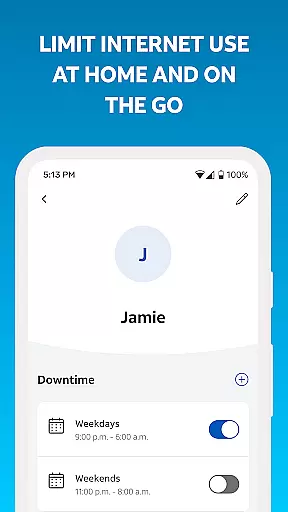
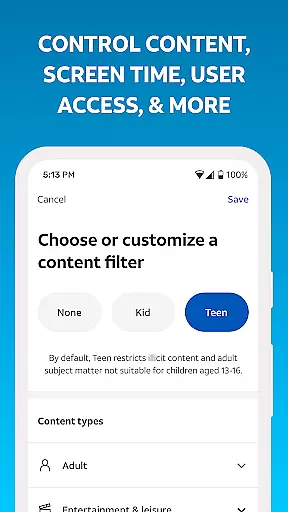
The app also enables easy management of your Wi-Fi network by allowing you to modify network names and passwords effortlessly. You can see all devices connected to your network and personalize their names for better identification. Advanced parental controls let you create profiles to manage screen time and set downtime schedules, ensuring a balanced digital environment for your family.
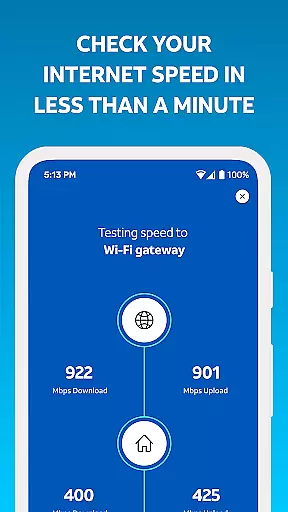
Additional functionalities include pausing Wi-Fi access for specific devices, testing Internet speed to your gateway, pinpointing weak signal spots, and receiving notifications about network health or outages. These features collectively provide a seamless and efficient way to oversee your home network's performance and security.
Task management is a cornerstone of productivity applications, and Smart Home Manager excels in this area by offering users comprehensive tools to oversee their home network efficiently. The app consolidates various network management tasks into one intuitive interface, allowing users to troubleshoot issues, update Wi-Fi settings, and manage connected devices without needing technical assistance.
Smart Home Manager enables users to perform essential tasks such as changing the Wi-Fi network name and password, setting up parental controls, and scheduling downtime to manage screen time for the family. These features are crucial for maintaining a secure and organized home network environment while ensuring that all family members adhere to healthy internet usage habits.
By integrating functionalities like pausing Wi-Fi access for specific devices and testing internet speed, the app empowers users with real-time control over their network. This immediate access to network management tasks significantly enhances user productivity by reducing the time and effort required to maintain an efficient home network.
Cross-device synchronization is vital for users who manage their home network across multiple devices. Smart Home Manager ensures reliable synchronization, enabling seamless access to network controls and settings from any compatible device. This reliability is critical for users who require consistent access to their home network management tools, regardless of the device they are using.
The app supports real-time updates across devices, meaning any changes made to the network settings, such as updating the Wi-Fi password or adjusting parental controls, are immediately reflected on all other devices connected to the account. This feature ensures that users have the most current information at their fingertips, enhancing their ability to manage the network effectively.
Furthermore, Smart Home Manager's synchronization capabilities extend to notifying users of service outages and network health issues, prompting timely actions such as restarting the Wi-Fi gateway. This reliability not only improves the overall user experience but also contributes to a more robust and responsive home network management process.
User-friendly interface
Comprehensive network tools
Customizable device profiles
Real-time network monitoring
Technician-free troubleshooting
Limited to AT&T customers
Requires compatible gateway
Dependent on Wi-Fi model
No offline functionality
Premium features may require subscription

 4.20
4.20
A Revolutionary All-in-One Artificial Intelligence Tools
3.80
aCalendar+ makes your day, week and month
4.70
Cloud storage, automatic phone backup, and more.
4.10
The AI assistant that thinks with you - write, code, and solve complex tasks
4.60
Code on-the-go with VScode for Android. Edit,debug and collaborate from mobile!!
3.10
Use powerful, industry-leading AI tools to generate visual charts from any data
4.80
Simple notepad & memo. Take notes, to-do list, shopping list with reminders.
4.80
Okta MFA
4.70
Multilingual translator for text, voice, and image translation!
4.90
Client for Nextcloud Deck
4.60
All document reader, all in one file viewer read PDF, DOCX, XLS, PPT, TXT files.
4.60
Planet Free VPN - The best Fast Unlimited and Secure VPN Without Logs
4.50
Total remote control for your Android device, PC and cloud services (IFTTT)!
4.20
Make apps & sites with natural language prompts
4.10
Intelligent AI Assistant
4.10
Mega cloud explorer plugin for Solid Explorer
3.80
Find and delete junk files & block unwanted notifications & manage files
3.70
ID.me Authenticator is a simple and free Two Factor Authentication solution
3.50





User Reviews