
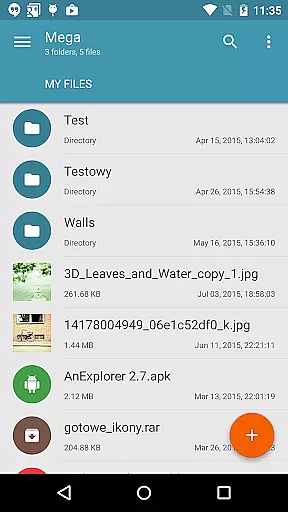
Mega Plugin for Solid Explorer is a productivity-focused extension that seamlessly integrates with your Solid Explorer file manager. This plugin enables users to directly connect their Mega cloud storage accounts, allowing for comprehensive file management without leaving the Solid Explorer interface. With support for all essential file operations, it serves as a bridge between local and cloud storage.
The plugin supports key functionalities such as copying, moving, renaming, and previewing files, alongside downloading and uploading capabilities. Additionally, users can stream multimedia content like music and videos directly from their Mega storage. Its intuitive connection process makes cloud integration quick and straightforward, enhancing overall workflow efficiency for both personal and professional use.
This plugin stands out through its robust feature set tailored for efficient cloud storage management. Users can perform a wide array of file operations including copy, move, rename, and direct file viewing, ensuring seamless interaction with their Mega accounts. The ability to download and upload files adds another layer of flexibility, while maintaining synchronization between local and cloud environments.
A particularly notable feature is the integrated media streaming capability, which allows users to play music and videos directly from Mega storage without needing to download them first. The plugin also emphasizes security and ease of access by providing a simple four-step connection process. By entering login credentials through Solid Explorer's interface, users can establish a secure link to their cloud drives, making file management both convenient and secure.
Task management is a critical aspect of productivity applications, and the Mega Plugin for Solid Explorer excels in this area by offering users comprehensive control over their cloud-based files.
This plugin allows you to perform a wide array of file operations directly within your Mega account. You can copy, move, rename, and view files with ease, streamlining your workflow and keeping your digital assets organized without the need to switch between different apps or platforms.
Additionally, the ability to download and upload files directly enhances the core task management features. This ensures that your work is not interrupted by cumbersome processes, allowing for efficient handling of documents, photos, and other important data.
By integrating these capabilities seamlessly into Solid Explorer, the plugin empowers users to maintain an uninterrupted flow of tasks, making it an invaluable tool for anyone looking to manage their cloud storage effectively.
Cross-device synchronization is essential for maintaining consistency and accessibility across multiple devices, and the Mega Plugin for Solid Explorer provides reliable performance in this regard.
Once connected to your Mega account, the plugin ensures that any changes made on one device are accurately reflected on all others. Whether you're editing documents, uploading photos, or managing multimedia content, you can trust that your updates will be synchronized promptly and securely.
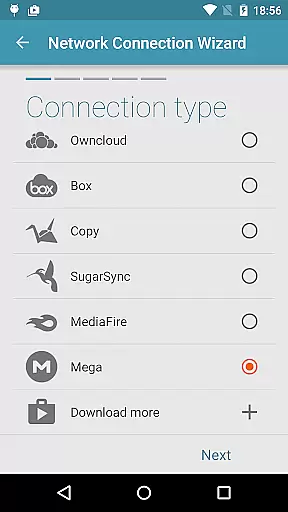
The process of connecting to Mega is straightforward: tap the + button, choose 'Cloud connection,' select the Mega option, enter your login credentials, and tap connect. Afterward, tapping again opens your cloud drive, where all your synchronized content resides.
This seamless integration and synchronization process make the plugin a dependable solution for users who require constant access to their files, regardless of the device they are using.
Seamless integration
Comprehensive file management
Secure cloud connection
Efficient media streaming
User-friendly setup
Limited to Mega users
Requires Solid Explorer
No standalone functionality
Premium account recommended
Occasional sync delays

A Revolutionary All-in-One Artificial Intelligence Tools
 3.80
3.80
Planet Free VPN - The best Fast Unlimited and Secure VPN Without Logs
4.50
Send files, sync SMS, notifications & clipboard across devices via local network
4.40
Absolutely the best CNC machinist speed and feed calculator around. fswizard.com
4.60
Fill, sign & send docs, forms, agreements & contracts via electronic signature.
4.50
ID.me Authenticator is a simple and free Two Factor Authentication solution
3.50
Ultimate Virtual AI Character for immersive Roleplay Chat. Perfect Companion
3.90
Understand anything with a personalized AI research assistant
4.80
Daily processing of PDF documents.
4.40
Android Wallet Password Manager
4.80
Functional QR scanner and barcode reader that requires little storage space.
4.60
Calendar 2023 widget for Android. Appointment scheduler, planner, and reminder
4.60
PDF scanner & converter for files, photos, lottery, QR codes. One swipe away!
4.50
Tally and goal counter for Wear OS & mobile
4.50
Enjoy classic gameplay with customizable features and retro-style graphics.
4.30
Access, manage and transfer files on Android, PC, Mac, NAS and cloud storages.
4.30
Create and edit presentations with Google Slides, part of Google Workspace.
4.00
Remotely view listen control and record cameras.
3.70
AI Video AI Image Private LLM AI Browser Llama Gemma Ollama Connect LLM Studio
4.0



User Reviews