
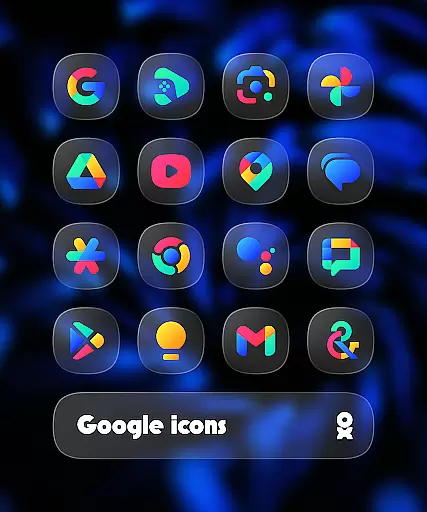
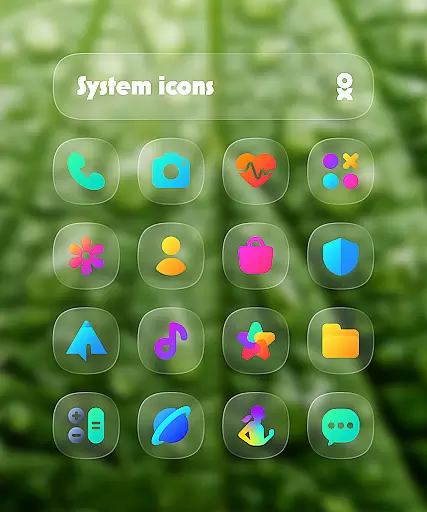
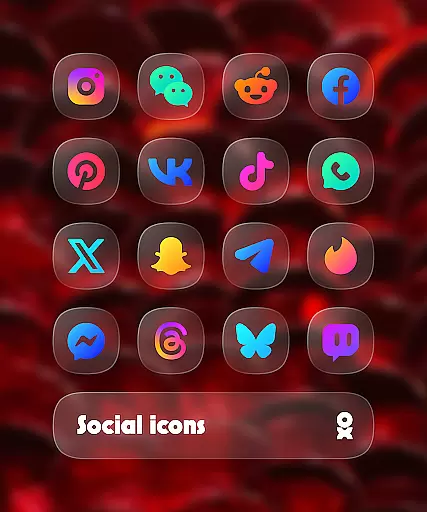
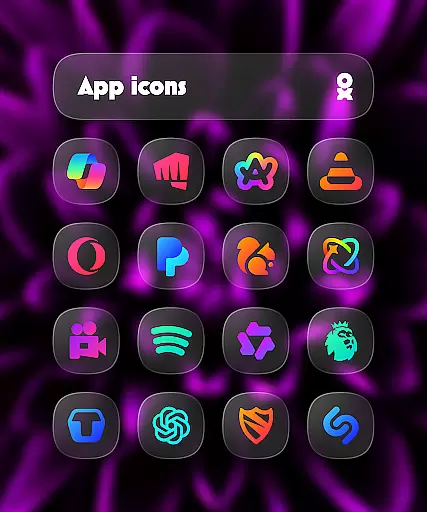
One UI Glass Color Icon Pack offers over 6000 crystal-clear, colorful squircle icons designed with a sleek and minimal aesthetic. Inspired by Samsung's One UI design language, this icon pack provides a modern and elegant look that seamlessly integrates with your device's interface.
The pack includes cloud wallpapers, an icon request tool, and regular updates to ensure compatibility with new apps. It supports various launchers including One UI Home, Nova Launcher, and Lawnchair Launcher, making it versatile for different devices and user preferences.
Whether you're looking to refresh your home screen or seeking a cohesive design language across your apps, this icon pack delivers both functionality and style, enhancing the overall user experience.
One UI Glass Color Icon Pack stands out with its comprehensive set of features tailored for customization enthusiasts. With over 6000 HD icons, users can enjoy high-quality visuals that maintain clarity and vibrancy on any device screen.
In addition to the extensive icon library, the pack includes cloud wallpapers that complement the icons, creating a harmonious and visually appealing home screen. The built-in icon request tool allows users to suggest new icons, ensuring the pack stays up-to-date with emerging apps.
Regular updates and compatibility with multiple launchers such as Smart Launcher 6 and Nothing Launcher make this icon pack a reliable choice for those seeking a personalized and future-proof device experience.
One UI Glass Color Icon Pack offers a wide array of customization options that cater to personal preferences and device aesthetics. With over 6000 HD icons, users can enjoy a crystal-clear and colorful experience that seamlessly integrates with their device's interface.
The pack includes cloud wallpapers and an icon request tool, ensuring that users have access to the latest designs and can request new ones as needed. This extensive library supports regular updates, keeping the content fresh and relevant.
Users benefit from the sleek and minimal look inspired by Samsungu2019s One UI design language, providing a modern and elegant feel. The variety ensures that there is something for everyone, whether you prefer vibrant colors or subtle tones.
This level of customization enhances user satisfaction by allowing individuals to tailor their device's appearance to match their unique style, making daily interactions more enjoyable and personalized.
Theme compatibility is a crucial aspect of the One UI Glass Color Icon Pack, ensuring seamless integration with various launchers. The pack is designed to work with numerous supported launchers such as One UI Home with Theme Park, Smart Launcher 6, Niagara Launcher, and many others.
For optimal performance, specific instructions are provided for different launchers. For instance, Nova Launcher requires shadow settings enabled, while Pixel Launcher users should use Shortcut Maker. These guidelines help maintain visual consistency across devices.
By supporting a broad range of launchers, the icon pack guarantees that users can apply their preferred themes without compatibility issues. This flexibility allows for a cohesive look and feel, enhancing the overall user experience.
Ultimately, theme compatibility ensures that users can fully utilize the icon pack's features, enjoying a harmonious and visually appealing interface regardless of their chosen launcher.
Extensive icon library
Cloud wallpapers included
Regular updates
Wide launcher support
Sleek minimal design
Requires supported launcher
No direct Pixel Launcher support
Paid Kustom Widgets needed
Limited manual application
FAQ not beginner-friendly

Make your phone look simple & luxury, like iDevice
 4.60
4.60
A launcher for Samsung Good Lock and Good Guardians modules without ads
4.70
The definitive Icon pack maker and editor
4.30
Run multiple accounts of the same app on a single device
4.10
Want to make your phone more special than ever?
4.60
Nothing Icon pack with more than 3750+ highly crafted icons.
4.70
Customize your home screen with stunning themes, blur, widgets & icons.
4.60
Embrace the Night. Unleash the power of darkness with Raven Dark Icon Pack
4.60
Modern Glass Icon Pack with glossy icons, clean minimal theme & aesthetic style
4.2
Sparkle your screen with Glitter Wallpapers For Girls and Cute Backgrounds!
4.80
Ultimate Gallery Lock App - Hide Pictures, Videos and Lock Apps Instantly!
4.60
Ultra realistic gold analog watch face with lots of customization options.
4.50
Transform your phone with Launcher iOS 26 - Smooth & elegant iOS experience
4.50 4.50
4.50
200+ Material Inspired Widgets
4.50
A light in the dark, a unique style and an andless cutomization!
4.30
Themes - Widget & Wallpaper: Customize home screen, icon changer w unique themes
4.30
Your home screen, just the way you like it.
4.30
Transfer your live wallpapers from Windows to Android using Wallpaper Engine!
4.00



User Reviews