
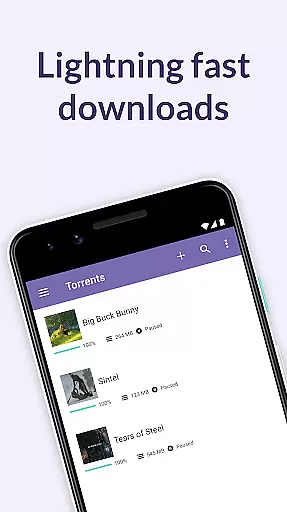
BitTorrent Pro is a premier torrent client designed for Android users who want to download torrents directly to their mobile devices without interruptions from ads. As the official BitTorrent app, it offers an ad-free experience with advanced features like battery saving and auto-shutdown capabilities. This application is ideal for those who wish to manage their media downloads efficiently while on the move.
The app stands out with its user-friendly interface and powerful functionality, including the ability to handle magnet links and torrents seamlessly. With integrated music and video players, users can enjoy their downloaded content effortlessly. Additionally, the app provides options to select specific files within a torrent, optimizing storage usage on your device.
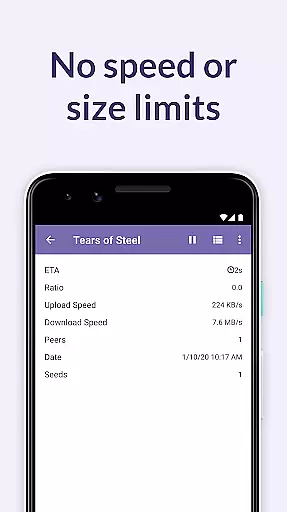
Whether you're downloading large files or streaming media, BitTorrent Pro ensures a smooth experience with no speed or size limits. Its innovative features cater to both casual downloaders and power users, making it the go-to choice for torrent management on Android platforms.
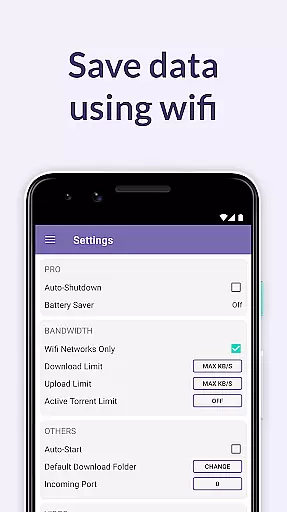
BitTorrent Pro boasts a range of features that enhance the torrent downloading experience on Android. One of its standout features is the Battery Saver, which suspends torrent activities when the battery level drops below a certain threshold, ensuring your device remains functional for other tasks. The Auto-shutdown feature further conserves resources by halting torrenting once downloads are complete and the app is running in the background.
The app also includes a clean, intuitive design that makes navigation straightforward. Users can enable Wifi-only mode to prevent excessive mobile data usage. Moreover, BitTorrent Pro allows users to choose download locations and decide whether to delete only the torrent or both the torrent and associated files, offering greater control over file management.
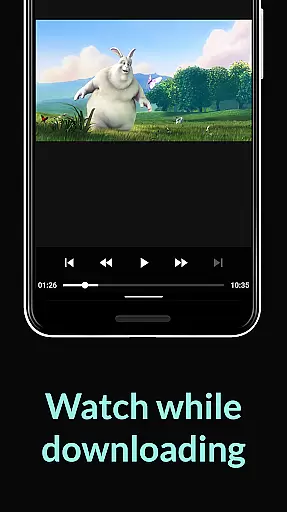
For media enthusiasts, the app provides enhanced playback options through integrated music and video players. It supports downloading licensed content from BitTorrent's partners and enables playlist creation for multiple audio files. These features, combined with continuous performance updates, ensure a reliable and enjoyable torrenting experience.
BitTorrent Pro stands out in video format compatibility, ensuring users can download and play a wide array of video files without hassle. The app supports numerous formats, allowing for seamless integration with your existing media libraries.
This flexibility is crucial for users who engage with various types of content. Whether you're downloading movies, TV shows, or user-generated clips, BitTorrent Pro's broad format support means there's no need to convert files before playback.
The inclusion of integrated music and video players enhances the experience further. This feature ensures that regardless of the video format, users can enjoy their media directly within the app, providing a smooth and uninterrupted viewing session.
Moreover, the ability to select specific files within a torrent for download allows users to manage storage efficiently. By choosing only the desired content, individuals can optimize their device's capacity while enjoying comprehensive video format support.
While primarily known for torrenting, BitTorrent Pro also incorporates AI-powered editing features that add significant value for users interested in content creation. These tools leverage advanced algorithms to simplify video editing tasks, making them accessible even to novices.
The app's intelligent editing capabilities include automatic tagging and categorization of downloaded media. This feature saves time by organizing content efficiently, allowing users to quickly locate and utilize specific clips or scenes in their projects.
Additionally, BitTorrent Pro offers enhanced performance improvements that benefit the editing process. The Canonical Peer Priority system not only optimizes download speeds but also ensures that high-quality source material is readily available for editing purposes.
Although not its primary function, these AI-driven enhancements demonstrate BitTorrent Pro's commitment to delivering a comprehensive multimedia experience. Users can now both acquire and modify content within a single platform, streamlining their creative workflow.
User-friendly interface
No speed or size limits
Battery saver mode
Auto-shutdown feature
Integrated media players
Paid subscription required
Limited free content
Occasional bugs reported
High resource usage
Not available on iOS

A full editing room to accompany your Insta360 cameras and handheld gimbals.
 3.30
3.30
HD Video player all format, HD Videos, Cast & Subtitle. No annoying ads.
4.60
You can play SWF format file!
2.50
IPTV-Smarters Player Pro M3U - Watch Live Stream TV Channels with Chromecast
4.00
A Quick and Pro Video Editor
4.70
AI Video Editor:AI Music, Text to Video,Text to Speech,Auto Caption,Video Effect
4.00
Cast to Smart TV, Fire TV. Cast video, photo - Fast & Stable!
3.90
Browser for Fire TV to stream webvideos, online movies, livestreams in HD
4.40
A Simple app to download Video & Music from the Internet.
4.70
Video Trimmer, Video to MP3 Converter. Extract music from video, Easy & Fast.
4.80
Seamlessly connect and control your smart devices, anytime, anywhere with ease.
4.60
Video Downloader, Multiple Resolution Options, Video Player
4.50
Powerful video player with advanced hardware acceleration and subtitle supports
4.20
Your media, on your terms.
4.10
Powerful, professional, versatile teleprompter. Developed by an active film crew
4.00
Stream Web Videos to Chromecast, Samsung, LG, Sony, Roku, Fire TV, DLNA + more
4.00
Watch full episodes of your favorite Cartoon Network and Cartoonito shows!
3.50
Mix with Virtual DJ directly from your phone or tablet !
3.10
Play and download HD videos from all sources — fast, simple, and all-in-one.
4.3



User Reviews