
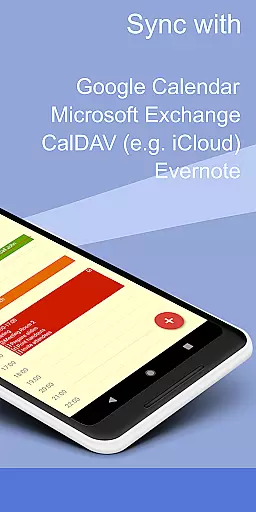
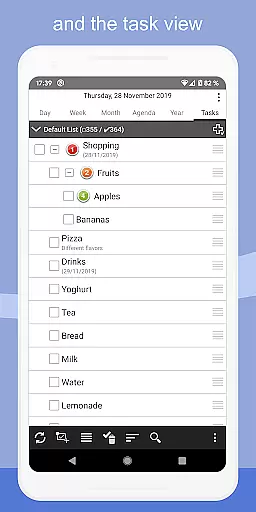
CalenGoo is a comprehensive productivity app designed to help users efficiently manage their events and tasks. With seamless synchronization capabilities, it connects directly with Google Calendar, Exchange, CalDAV, and iCloud, ensuring all your past and future events are always up-to-date across devices. The app also supports task management, allowing you to sync tasks with the same services.
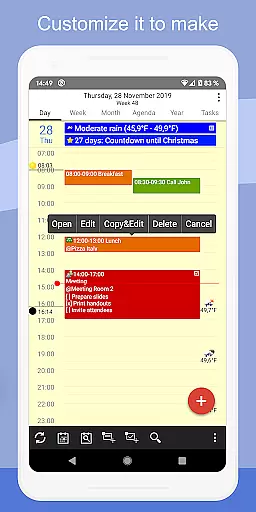
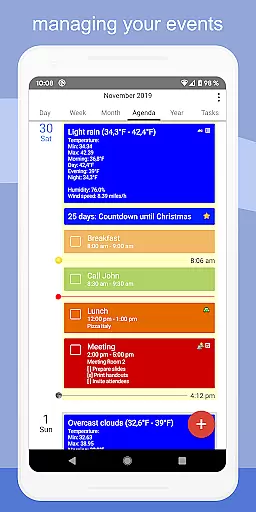
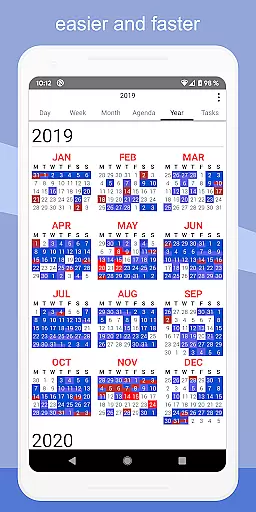
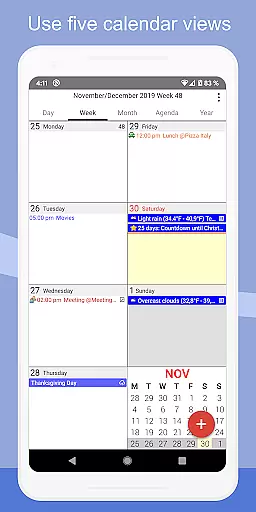
One of the standout features of CalenGoo is its high level of customization. Users can personalize the interface with five types of calendar views (day, week, month, agenda, and year), four styles of agenda views, and options for dark and light themes. Additionally, you can attach photos, files, and even Evernote notes to events, making it an invaluable tool for organizing both personal and professional schedules.
CalenGoo is particularly useful for individuals who need a robust organizational tool that works across multiple platforms. Whether you're scheduling meetings, setting reminders, or planning long-term projects, this app provides the flexibility and functionality needed to stay on top of your busy life.
CalenGoo offers an impressive array of features that cater to various productivity needs. One of its key strengths is the ability to sync with multiple calendar and task services, including Google Calendar, Exchange, CalDAV, and iCloud. This ensures that all your events and tasks are consistently updated, no matter where you access them from.
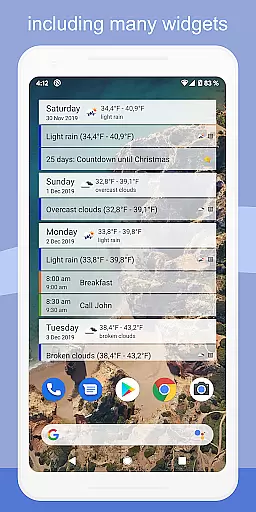
The app provides extensive customization options, allowing users to tailor the experience to their preferences. You can choose from five different calendar views (day, week, month, agenda, and year) and four distinct agenda view styles. Additionally, CalenGoo supports drag-and-drop functionality for moving and copying events, widgets for quick access to your schedule, and a weather forecast feature to help plan your day.
Another notable aspect is the app's support for attaching photos, files, and Evernote notes to events, as well as linking contacts and adding tasks within events. With features like spoken reminders, pop-up notifications, and the ability to print to PDF, CalenGoo ensures that users have all the tools they need to manage their time effectively.
CalenGoo offers robust core task management features that allow users to efficiently organize their schedules and responsibilities. The app supports syncing tasks with multiple services including Google Calendar, Exchange, CalDAV, and iCloud, ensuring seamless integration with existing workflows.
One of the standout functionalities is the ability to attach photos, files, and even Evernote notes to events, enhancing the context and utility of each task. This feature proves invaluable for users who need to associate relevant materials directly with their calendar entries.
The app also provides five distinct calendar views - day, week, month, agenda, and year - along with four customizable agenda styles. These options empower users to tailor the interface according to their preferences, optimizing both visibility and accessibility of their tasks.
Additionally, CalenGoo incorporates widgets that display events right on the home screen, keeping important deadlines and appointments always visible. With comprehensive reminder functions, such as notifications and spoken reminders, staying on top of tasks has never been easier or more intuitive.
Cross-device synchronization is a critical component of CalenGoo's productivity suite, enabling reliable and consistent access to your events and tasks across various platforms. By supporting direct syncs with Google Calendar, Exchange, CalDAV, and iCloud, the app ensures that all your data remains up-to-date regardless of the device you are using.
This synchronization extends beyond mere event details; it includes advanced features like attaching photos and files to events when synced directly with Google Calendar. Such capabilities ensure that every piece of relevant information follows you wherever you go, maintaining continuity in your workflow.
Moreover, CalenGoou2019s support for Exchange categories through EWS (Exchange Web Services) enhances organizational clarity by allowing shared calendars within teams. This fosters collaboration while preserving individual accountability, making group projects more manageable and transparent.
With its versatile widget system displaying different calendar views on the home screen, CalenGoo guarantees real-time updates at a glance. Whether switching between devices or sharing calendars among colleagues, this app delivers dependable cross-device performance essential for modern professionals seeking efficiency and coherence in their daily operations.
Highly customizable
Multiple sync options
Comprehensive task management
User-friendly interface
Versatile event attachments
Complex for beginners
Paid version only
Occasional sync issues
Limited free trial
Heavy on resources

Secure, fast, open-source, VNC and SSH Remote Desktop for Windows, Linux and Mac
 4.70
4.70
AI Video AI Image Private LLM AI Browser Llama Gemma Ollama Connect LLM Studio
4.2
Total remote control for your Android device, PC and cloud services (IFTTT)!
4.20
Make your handwriting beautiful, even more than pen on paper.
3.60
aCalendar+ makes your day, week and month
4.70
Todo reminder
4.10
Multilingual translator for text, voice, and image translation!
4.90
Seamlessly read, manage, and organize all your PDF files solution in one place
4.40
QuickEdit is a fast, stable and full featured text and code editor.
4.20
Best Tool for the professionals Electrician, Electrical contractors, etc.
4.90
Scientific calculator for Android - looks and operates like the real thing!
4.90
Stay on top of your to-dos with Google Tasks, part of Google Workspace.
4.60
A Pixel Art watchface inspired by other iconic 90s designs for Wear OS devices!
4.40 4.20
4.20
A customizable calendar for your Wear OS watch
4.20
Unlock AutoNotification
4.00
Secure, open-source, SPICE and SSH Remote Desktop for QEMU KVM virtual machines
4.00
⏰ Finally a timer app which can run multiple timers simultaneously on your watch
3.90
The upgraded version of Name Wheel with AI and the power to add your own wheels.
4.1





User Reviews