
Microsoft PowerPoint is the quintessential presentation tool that empowers users to create, edit, and present slideshows with ease from their mobile devices. The app offers a familiar interface with added functionalities such as Presenter Coach, an AI-driven feature designed to refine public speaking skills by providing real-time feedback on pace, language, and delivery. With seamless synchronization across devices, PowerPoint ensures that your presentations are always up-to-date, eliminating concerns about multiple file versions.
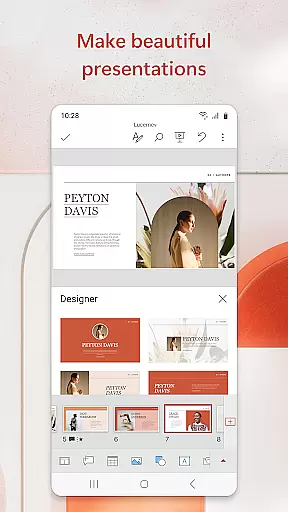
This productivity app stands out with its customizable templates and multimedia integration capabilities, allowing users to craft engaging presentations complete with music, graphics, charts, photos, and videos. Whether you're preparing quarterly reports or delivering yearly summaries, PowerPoint's versatile tools help make your content shine. The app also facilitates collaboration, enabling teams to work together in real time, share feedback through integrated comments, and manage permissions effortlessly.
PowerPoint is not just for creating presentations; it's a comprehensive solution for anyone looking to communicate ideas effectively. Its intuitive design and powerful features ensure that whether you're presenting on-the-go or perfecting your delivery at home, you can do so with confidence. Suitable for professionals, educators, and students alike, this app transforms how we prepare and deliver information, making every presentation impactful.
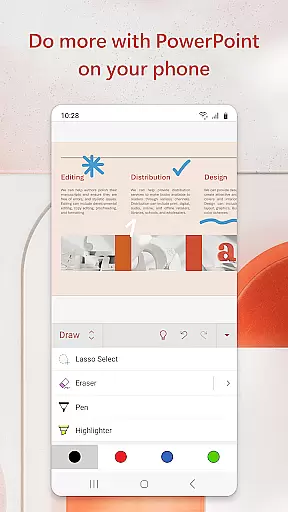
Microsoft PowerPoint boasts an array of features tailored to enhance productivity and creativity. At its core, the app provides robust tools for designing visually appealing slides, including customizable templates, themes, and layouts. Users can incorporate multimedia elements like images, videos, and audio files directly into their presentations, ensuring dynamic and interactive content delivery. Additionally, advanced charting options allow for clear data visualization, making complex information more digestible.
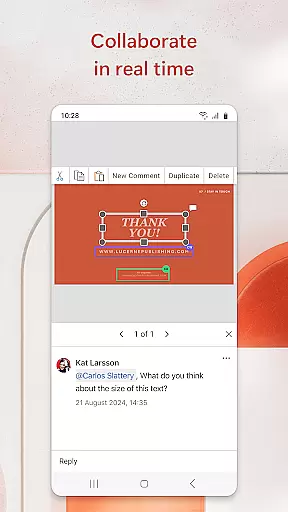
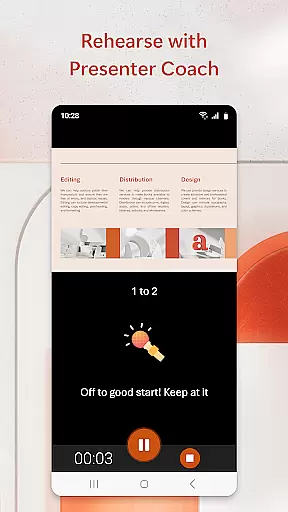
A standout feature is Presenter Coach, which leverages artificial intelligence to improve public speaking skills. This tool listens to your practice sessions, offering constructive feedback on pacing, filler words, and speech clarity. It even includes a presentation timer to help you stay within allocated time frames. Furthermore, PowerPoint supports real-time collaboration, enabling multiple users to edit documents simultaneously while tracking changes through integrated comments and version history.
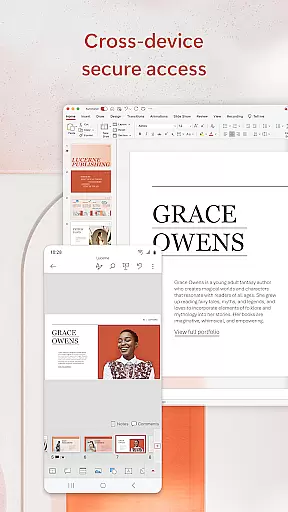
The app's cross-device compatibility ensures that whether you're working on a smartphone, tablet, or PC, your projects remain consistent and accessible. With cloud integration, files sync automatically across all devices, streamlining workflow and enhancing team productivity. These features collectively contribute to a seamless user experience, positioning PowerPoint as an indispensable tool for modern professionals seeking efficient communication solutions.
Microsoft PowerPoint offers robust core task management features that streamline the process of creating, editing, and presenting slideshows. This functionality ensures users can efficiently organize their presentation tasks in one place.
The app allows for seamless integration between devices, syncing files across smartphones, tablets, and PCs. This means you can start a presentation on your mobile device and continue refining it on your desktop without worrying about version control.
With real-time collaboration tools, PowerPoint enables multiple users to work on the same presentation simultaneously. Integrated comments and permissions management ensure everyone stays aligned and informed throughout the project lifecycle.
Additionally, PowerPoint's Presenter Coach feature helps users refine their delivery by providing AI-driven feedback on pacing, language usage, and more. This ensures presentations are not only well-prepared but also delivered with confidence and clarity.
Cross-device synchronization is a cornerstone of Microsoft PowerPoint's productivity suite, ensuring reliable access to your presentations no matter where you are or what device you're using. This feature guarantees that all changes made on one device will reflect instantly across all others.
PowerPoint achieves this through its cloud-based infrastructure, which securely stores your files and updates them in real time. Whether you're editing slides on your phone during a commute or finalizing details on your office PC, you'll always have the most up-to-date version at hand.
This reliability extends to collaborative projects as well. Team members can work together on presentations from different locations and devices, seeing each other's edits immediately. This fosters efficient teamwork and minimizes the risk of conflicting versions or lost updates.
Furthermore, PowerPoint's automatic save feature ensures no work is ever lost due to unexpected interruptions. Combined with cross-device sync, this creates a dependable environment for both individual and team-based presentation tasks.
User-friendly interface
Real-time collaboration
AI-powered Presenter Coach
Seamless cross-device syncing
Rich multimedia support
Subscription fees apply
Limited offline functionality
Advanced features require learning
Occasional sync issues
Resource-intensive on older devices

The upgraded version of Name Wheel with AI and the power to add your own wheels.
 4.0
4.0
Font maker keyboard with your own handwriting
4.10
Multilingual translator for text, voice, and image translation!
4.90
All document reader, all in one file viewer read PDF, DOCX, XLS, PPT, TXT files.
4.60
Experience and share your SolidWorks designs on your Android® phone and tablet.
2.50
Share files & memories safely. Keep your photos and videos secure.
4.40
AI Chatbot and AI writing assistant powered by ChatGPT.
4.60
Browse and view your photos and videos from the phone with photo & video hide.
4.10
QuickEdit is a fast, stable and full featured text and code editor.
4.20
Scientific calculator for Android - looks and operates like the real thing!
4.90
Understand anything with a personalized AI research assistant
4.80
Simple notepad & memo. Take notes, to-do list, shopping list with reminders.
4.80
Stay on top of your to-dos with Google Tasks, part of Google Workspace.
4.60
Lightweight PDF, Word, Excel reader.
4.60
A lightweight JSON & XML files creator, editor and viewer (Premium Version)
4.40
Device's storage information in a simple and clear graphical form (infographics)
4.10
Cloud storage, automatic phone backup, and more.
4.10
Ultimate Virtual AI Character for immersive Roleplay Chat. Perfect Companion
3.90
Create study competitions, track your hours, and stay consistent with friends
4.2






User Reviews