
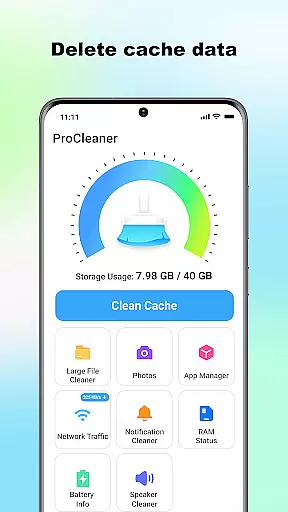
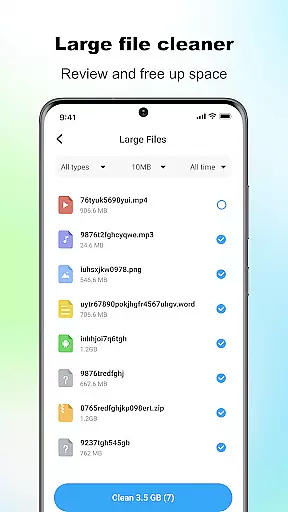
ProCleaner is a comprehensive device optimization tool designed to help users efficiently manage their smartphone storage. The app's core functionality revolves around scanning and cleaning cache files, removing residual and junk files, and identifying large files for better storage management.
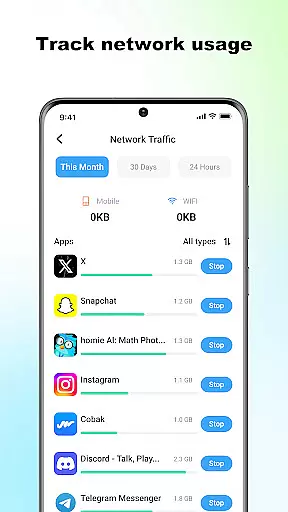
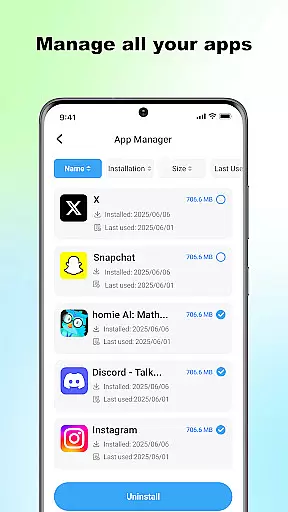
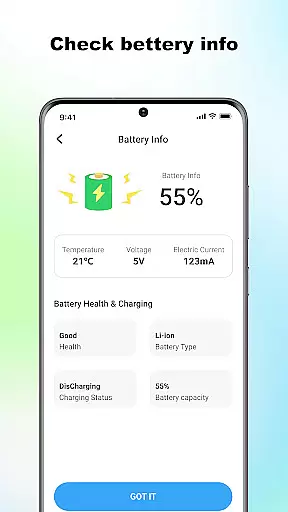
Beyond basic cleaning features, ProCleaner offers advanced capabilities such as batch application uninstallation, real-time network speed monitoring, and battery status checking. These features make it particularly useful for users who want to maintain optimal device performance while keeping their storage space organized.
The app is especially valuable for users with older devices or limited storage capacity, providing them with the tools needed to maximize available space without compromising important data. All operations are performed locally, ensuring user privacy and data security.
ProCleaner stands out through its diverse range of practical features that cater to various device maintenance needs. The app's signature capability lies in its intelligent scanning system, which can detect different types of unnecessary files including cache, residual, and junk files across the device.
What makes ProCleaner particularly innovative is its multi-functional approach to device management. Users can not only clean unwanted files but also monitor network speed, check battery health, and manage installed applications through batch uninstallation. The app's interface provides clear visual indicators for each function, making it easy for users to understand their device's current status.
Additionally, the app implements strict privacy protection measures by performing all operations locally on the device. This ensures that no personal data is collected or transmitted during the cleaning process, giving users peace of mind while optimizing their devices.
ProCleaner excels in delivering accurate and effective core functions that ensure optimal device performance. The app meticulously scans and cleans cache files, residual data, and junk files, which are common culprits of storage bloat.
In addition to basic cleaning, the app provides advanced features such as locating and managing large files, allowing users to make informed decisions about their storage usage. Its uninstallation tool supports batch operations, enabling efficient removal of multiple applications simultaneously.
The network speed monitor and battery status checker further enhance the user experience by providing real-time insights into device performance. These tools collectively contribute to a smoother, more responsive device operation.
All operations are performed locally, ensuring privacy and security while maintaining high performance standards. This approach not only optimizes storage but also extends the overall lifespan of the device.
A hallmark of ProCleaner is its commitment to interface simplicity and intuitive design. The app's layout is carefully crafted to ensure that even novice users can navigate and utilize its powerful features with ease.
Each tool is presented with clear labels and straightforward options, minimizing the learning curve typically associated with utility applications. Users can initiate comprehensive scans or manage large files without needing extensive technical knowledge.
Moreover, the app consolidates all essential functions into a single dashboard, streamlining the user experience. This cohesive design reduces the number of steps required to perform critical tasks, enhancing overall efficiency.
By focusing on an accessible interface, ProCleaner ensures that users of all skill levels can maintain their devices effectively, making it a reliable choice for anyone seeking to optimize their device's performance effortlessly.
User-friendly interface
Comprehensive cleaning options
Local data processing
Batch uninstall feature
Real-time monitoring tools
Limited advanced features
No cloud backup option
Premium version costs
Occasional false positives
Basic design aesthetics

 4.10
4.10
Quickly switch to an encrypted DNS server on Android TV
4.50
Unlock your Essential Key. Create custom shortcuts to your favorite apps!
4.1
card-reader app
2.20
App to pay for FUTO Keyboard
4.60
Forza Tuning Calculator App for Forza Horizon 5, Motorsport and Earlier Titles
4.40
MS-DOS in your pocket. Play old DOS games anywhere you are ;)
4.10
Pro Emulator is an easy to use game console emulator for a range of consoles.
4.40
Your personal health butler
3.60
NFC Tools can read and write NFC tags.
4.70
FV File Manager Pro, Fast and powerful file manager for Android
4.60
With videos, electrical calculators, and built-in ebook, Ugly’s has your answer.
4.50
The Ultimate Bluetooth Keyboard & Mouse. Securely control your PC, Mac, and more
4.50
Just swipe the edge to do something!
4.40
Use your phone as a webcam on your computer over WiFi or USB.
4.40
Safely recover deleted photos, videos, and files with a single easy tap.
3.70
This app unlocks the Pro features of the Central for DayZ app
3.60
A recovery soft,it features photo recovery, video recovery, file recovery.
3.40
Undelete and recover your lost or deleted files with DiskDigger!
3.40



User Reviews