
AZ Screen Recorder is a versatile screen recording application designed for Android users who need to capture high-quality screen videos with audio. The app offers multiple functionalities including screen recording, video editing, live streaming, and image editing, making it suitable for various use cases such as gameplay recording, video calls, and tutorials.
One of the standout features of AZ Screen Recorder is its ability to record without watermarks or time limits, ensuring professional-grade output. It also supports internal audio recording, facecam integration, and GIF conversion, providing flexibility in content creation. Whether you're a gamer looking to share your best moments or a professional wanting to create engaging presentations, this app caters to all your screen recording needs.
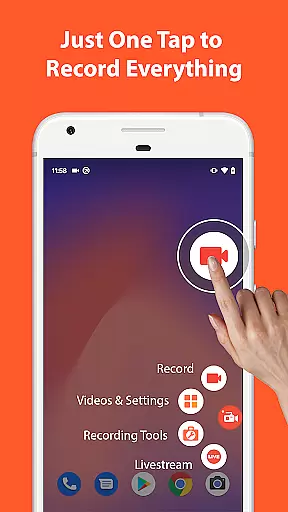
The app's intuitive interface allows users to easily start, pause, and stop recordings while offering advanced options like drawing on the screen during recording. Additionally, its built-in video editor lets users trim, merge, add subtitles, and compress videos, enhancing post-production capabilities. With compatibility for resolutions up to 4K and support for different frame rates, AZ Screen Recorder ensures top-notch quality for diverse recording scenarios.
AZ Screen Recorder stands out due to its comprehensive feature set tailored for both casual and professional users. Its primary function, screen recording, includes options to capture audio from the microphone or internal sources, making it ideal for recording gameplay, video calls, or app demonstrations. Advanced controls allow users to pause/resume recordings, draw on the screen, and even shake their device to stop recording, offering a seamless user experience.
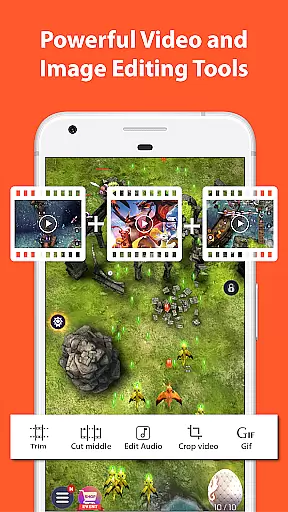
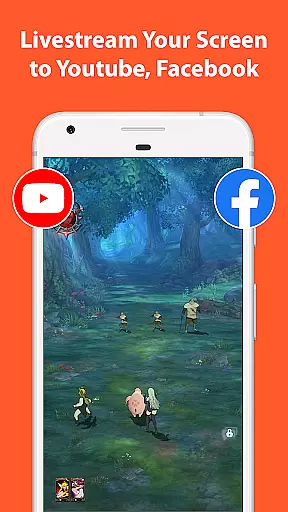
Beyond recording, the app provides a robust video editor that supports trimming, merging, adding subtitles, and compressing videos. These tools enable users to refine their recordings without needing additional software. Furthermore, the app facilitates live streaming to platforms like YouTube and Facebook, allowing creators to broadcast their screens alongside audio and optional facecam integration.
For those needing more than just video capabilities, AZ Screen Recorder includes screenshot and image editing features. Users can stitch images, crop unwanted sections, blur sensitive areas, and annotate screenshots with text or emojis. This multi-purpose functionality positions AZ Screen Recorder as an all-in-one solution for capturing and editing both video and image content on Android devices.
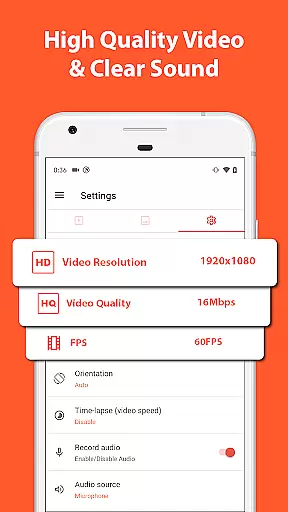
Video format compatibility is a crucial feature for any video recording and editing application, ensuring that users can work with a wide range of video formats without facing conversion issues. AZ Screen Recorder stands out in this aspect by supporting various resolutions from HD, FullHD, 2K to 4K, although 4K recording is available only to some users and devices.
The app's ability to record in multiple resolutions makes it versatile for different use cases, whether you're capturing high-quality gameplay footage or simply recording a video call. The inclusion of different frame rates such as 24fps, 30fps, and 60fps further enhances its flexibility, catering to both casual users and professional content creators who require precise control over their video settings.
Moreover, the screen recorder supports internal audio recording, which means you can capture the original sound from games or apps directly, making it an ideal tool for creating content that requires synchronized audio-visual elements. This feature significantly broadens the scope of projects you can undertake, from live streaming on platforms like YouTube or Facebook to recording detailed tutorials or demonstrations.
By offering extensive video format compatibility, AZ Screen Recorder ensures that your recordings are not just limited to specific devices or platforms, thus maximizing the potential audience reach and usability of your content across different mediums and devices.
AI-powered editing features represent the cutting edge of video editing technology, enabling users to enhance their videos with minimal effort through intelligent automation. AZ Screen Recorder incorporates several AI-driven tools that simplify the editing process, allowing users to focus more on creativity rather than technical details.
Among these features is the ability to trim videos, remove unwanted sections, merge clips, add background music, insert subtitles, extract frames, crop, rotate, and compress videos. These functionalities empower users to refine their recordings efficiently, ensuring that the final output meets their exact specifications and quality standards.
In addition to basic editing capabilities, the app offers advanced options such as drawing on the screen during recording, adding text or emojis, and blurring specific areas in screenshots. Such features leverage AI algorithms to provide intuitive controls and real-time previews, enhancing the overall user experience and enabling even beginners to produce polished and professional-looking content.
Furthermore, the integration of AI-powered editing tools within AZ Screen Recorder streamlines workflows, reduces editing time, and opens up new creative possibilities. Whether you're looking to create engaging social media posts, comprehensive tutorials, or captivating live streams, these smart features ensure that your content stands out and resonates with your audience.
User-friendly interface
High-quality video output
No watermark or time limit
Internal audio recording
Comprehensive editing tools
Premium features require payment
Some features limited to specific devices
Occasional performance issues
Ads in free version
Complexity for beginners

VLC Remote lets you control your VLC Media Player on Mac, PC or Linux.
 4.60
4.60
Support 1000+ Video Format, Subtitle Download, mp3 & Background Play, Cast On TV
4.60
Explore the largest library of free GIFs, Stickers & Memes - or create your own!
3.90
All in one HD video downloader & player for multiple formats with full privacy
4.70
Fast & Private Video Downloader App. Save all videos easily from the Internet.
4.40
Download videos and play them offline
4.70
Mix with Virtual DJ directly from your phone or tablet !
3.10
Viddo: Generate Action Figure, AI Anime, AI kiss, AI hug Video from image & text
4.40
Video&Drama Player All Format is a HD video player, music player
3.00
Watch IPTV on your Android device
4.60
?100% FREE! Download & save videos? safely in this app. All formats supported.
4.60
Cast movies, tv shows and live streams to Chromecast, Roku, DLNA, Fire TV & more
4.60
Download website videos fast&privacy
4.40
Your media, on your terms.
4.10
Browser for Samsung TV to stream webvideos, online movies and livestreams in HD
4.10
All format media Player, no need video converter any more!
4.00
Fast private browser with secure, seamless access & supported video downloads!
4.00
Capture images & record videos for USB Camera, Webcam, Microscopes, Endoscopes
3.80
Download videos easily & play them all in one smart, powerful video manager.
3.40




User Reviews