
Goblin Tools is a productivity app designed to simplify everyday tasks through a collection of small, intuitive tools. It offers solutions for task management, text analysis, decision-making, and more, making it especially useful for neurodivergent individuals. The app provides clever helpers that break down complex challenges into manageable steps, helping users with ADHD, autism, and executive dysfunction navigate their daily lives more effectively.
With features like Magic ToDo for task breakdowns, Formalizer for tone adjustment in text, and Chef for recipe creation, Goblin Tools delivers practical value in a straightforward package. Whether you're managing work projects or personal responsibilities, this app helps streamline processes while maintaining an ad-free experience.
Goblin Tools stands out with its diverse range of specialized features tailored to enhance productivity. Each tool serves a unique purpose: Magic ToDo breaks tasks into smaller steps, Formalizer adjusts the tone of written communication, Judge analyzes emotions behind messages, and Professor simplifies complex information. These functions are particularly beneficial for those facing cognitive or organizational challenges.
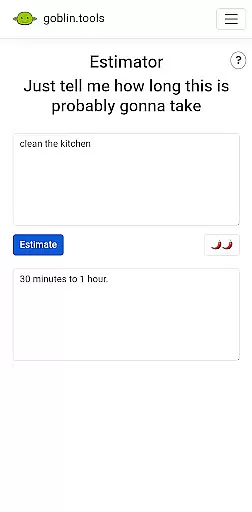
The app also includes Consultant for decision support, Estimator for activity time predictions, Compiler for organizing thoughts, and Chef for creative meal planning. Every feature is crafted to assist users in overcoming mental clutter and fostering clarity. By focusing on accessibility and ease of use, Goblin Tools ensures that even those with neurodivergent needs can benefit from technology without feeling overwhelmed.
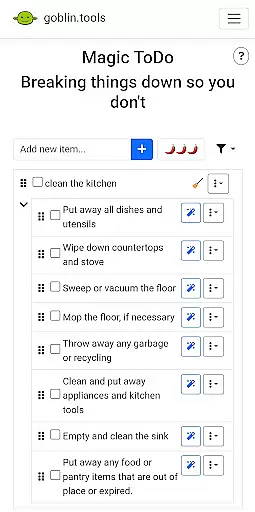
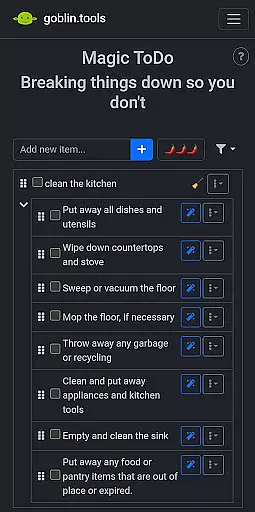
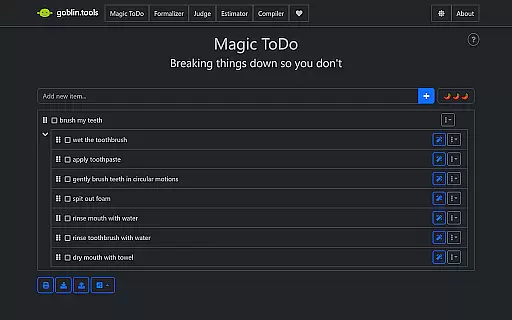
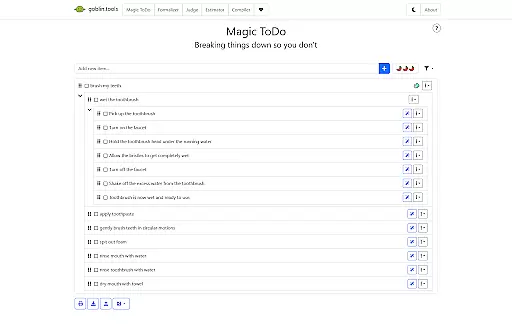
At the heart of Goblin Tools lies its ability to simplify core task management for users who often feel overwhelmed. This app breaks down large, complex tasks into manageable steps through its Magic ToDo feature.
The Magic ToDo tool is specifically designed to cater to individuals with ADHD, autism, and executive dysfunction, helping them gain clarity and reduce anxiety associated with daunting tasks. By segmenting responsibilities into bite-sized actions, it aids in maintaining focus and improving productivity.
Users benefit from a structured approach to daily activities, which enhances their capacity to initiate and complete tasks efficiently. The clever design ensures that each small step is easy to follow, promoting a sense of accomplishment with every tick off the list.
Goblin Tools ensures reliable cross-device synchronization, allowing users to seamlessly transition between devices without losing their progress or data. This feature is crucial for those managing neurodivergent challenges across different environments.
Whether you're using your phone on the go, switching to a tablet at home, or accessing the tools on your computer at work, all your information remains up-to-date and consistent. Real-time updates mean that changes made on one device instantly reflect on others, providing an uninterrupted experience.
This synchronization empowers users by offering flexibility and peace of mind, knowing their essential tools and data are always within reach, no matter where they are or what device they choose to use.
User-friendly interface
Wide variety of tools
Supports neurodivergent users
Ad-free experience
Practical life solutions
Limited advanced options
No offline functionality
Requires learning curve
Occasional bugs reported
Premium version needed

Device's storage information in a simple and clear graphical form (infographics)
 4.10
4.10
Cloud storage, automatic phone backup, and more.
4.10
The AI assistant that thinks with you - write, code, and solve complex tasks
4.60
All document reader, all in one file viewer read PDF, DOCX, XLS, PPT, TXT files.
4.60
Calendar 2023 widget for Android. Appointment scheduler, planner, and reminder
4.60
Docker, Kubernetes management over Portainer Mobile
4.40
* block pre-roll ads, pop-up and forced redirect ads * Samsung certification app
4.00
Intelligent AI Assistant
4.10
Browse and view your photos and videos from the phone with photo & video hide.
4.10
Understand anything with a personalized AI research assistant
4.80
To do list widget with a notebook organizer, checklist, simple shopping list
4.60
Client for Nextcloud Deck
4.60
Subscribe to Webcal & .ics calendars and keep them up-to-date!
4.50
CalenGoo is a very flexible and feature-rich calendar app
4.40
Access, manage and transfer files on Android, PC, Mac, NAS and cloud storages.
4.30
Total remote control for your Android device, PC and cloud services (IFTTT)!
4.20
Activate Two Factor Authentication (2FA or Multi OTP), Password manager and more
4.10
Customizable calendar widget for seamless event sync, planning & scheduling.
4.00
Auto-shutoff Alarm with Sunrise, Sunset & Fixed Options.
3.50






User Reviews