
Microsoft Copilot is an advanced AI productivity tool designed to assist users in accomplishing a wide range of tasks through intelligent chat assistance and creative tools. The app integrates GPT-5, the latest in AI technology, offering both reasoning and conversational capabilities that enhance user experience across platforms.
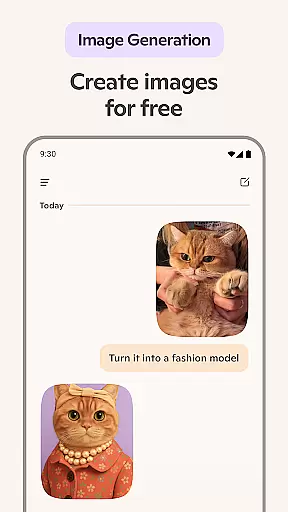
With features such as AI-driven text summarization, language translation, content creation, and even image generation from textual descriptions, Microsoft Copilot serves as a versatile assistant for both personal and professional needs. Whether drafting emails, generating artwork, or organizing thoughts, this app provides intuitive support tailored to boost efficiency and creativity.
Users can leverage Microsoft Copilot to streamline workflows, generate high-quality visuals, and receive instant insights on complex topics. This makes it particularly valuable for professionals seeking to optimize their productivity while maintaining high standards of quality in their work output.
Microsoft Copilot stands out with its comprehensive suite of AI-powered features. One notable capability is its 'Smart' mode, which utilizes GPT-5 to deliver precise answers and summaries to complex queries through simple conversations. This feature simplifies information retrieval and decision-making processes significantly.
The app also includes robust tools like an AI photo generator that transforms text prompts into detailed images, aiding in creative projects such as logo design, storyboarding, and social media content creation. Additionally, the AI chat assistant supports voice interactions, making it accessible for composing narratives or generating ideas hands-free.
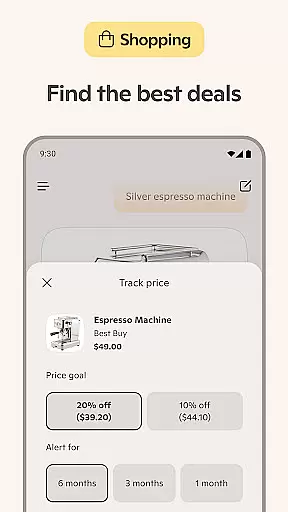
Furthermore, Microsoft Copilot enhances productivity by assisting with everyday tasks such as drafting emails, proofreading documents in multiple languages, and creating shopping lists. These practical applications ensure that users can focus more on strategic activities while delegating routine chores to their virtual assistant.
At the heart of Microsoft Copilot lies its robust core task management capabilities, designed to streamline both personal and professional workflows. This AI-driven productivity tool excels in organizing tasks, setting priorities, and managing time effectively.
The application leverages advanced AI algorithms to provide summarized answers and straightforward solutions to complex problems, all through simple conversational interfaces. Whether it's drafting emails, creating shopping lists, or preparing weekly meal plans, Copilot ensures that every task is executed with precision and ease.
Users benefit from features such as multi-language support, which allows for translation and proofreading across hundreds of languages, including regional dialects. This makes international communication seamless and efficient, enhancing global collaboration.
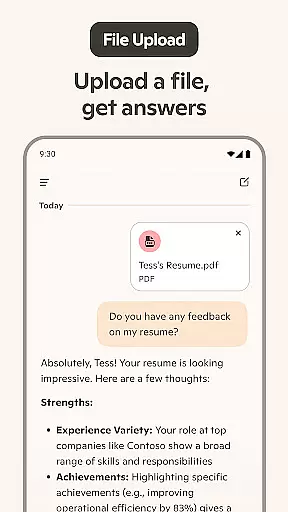
Moreover, Copilot acts as a personal writing assistant, capable of composing and editing various types of documents, from cover letters to resumes. Its ability to research topics and generate well-rounded content empowers users to accomplish more with less effort, making it an indispensable tool for modern productivity.
Microsoft Copilot sets a new standard in cross-device synchronization reliability, ensuring that your data and preferences are consistently updated across all your devices. This feature is crucial for users who rely on multiple platforms for their daily tasks and need a seamless transition between them.
The app employs state-of-the-art cloud technology to maintain real-time updates, allowing users to start a task on one device and continue it on another without missing a beat. Whether you're switching from your desktop to your smartphone or vice versa, Copilot guarantees that your work remains intact and accessible.
This synchronization extends beyond mere text documents; it encompasses AI-generated images, chat histories, and personalized settings. As a result, users can enjoy a cohesive experience regardless of the device they choose to use, fostering a truly integrated digital environment.
By prioritizing reliability and consistency, Microsoft Copilot not only enhances productivity but also provides peace of mind, knowing that your work is always up-to-date and secure across all your devices.
Advanced AI models
Versatile productivity tools
Intuitive user interface
Comprehensive language support
Creative design assistance
Requires internet connection
Premium features may cost extra
Steep learning curve for beginners
Limited offline functionality
Privacy concerns with data usage

Client for Nextcloud Deck
 4.60
4.60
A customizable calendar for your Wear OS watch
4.20
Take control of your clipboard with Clipper!
3.90
Android Wallet Password Manager
4.80
A lightweight JSON & XML files creator, editor and viewer (Premium Version)
4.40
Todo reminder
4.10
Fill, sign & send docs, forms, agreements & contracts via electronic signature.
4.50
Great calculator for Android named one of USA TODAY's "25 Essential Apps".
4.90
Access your phone's notifications, calls, apps, photos & texts on your PC
3.90
We're working to become the best machining app on the market! www.cncdirt.com
4.80
The AI assistant that thinks with you - write, code, and solve complex tasks
4.60
A simple Whisper AI keyboard for reliable speech transcription and rewording
4.60
To do list widget with a notebook organizer, checklist, simple shopping list
4.60
This small app MUST BE INSTALLED after purchase, else license won't work
4.40
When you Focus, so will your Bean in this cozy focus timer
4.30
Automates browsing any website and notifies you of important changes or events
4.30
Secure, open-source, SPICE and SSH Remote Desktop for QEMU KVM virtual machines
4.00
A simple, portable logger for POTA, SOTA, Field Day, and more
4.2
IP Camera Viewer - Android TV : RTSP Surveillance camera viewer for Android TV
4.2









User Reviews