
Dictate Keyboard is a revolutionary productivity tool designed to streamline text input through advanced speech recognition technology. This powerful keyboard app converts spoken language into accurate text, supporting all common national languages. Its AI-driven transcription engine not only recognizes words but also automatically adds punctuation, making it an ideal solution for professionals who need efficient documentation tools.
The application goes beyond basic transcription by offering features like custom rewording instructions using GPT-5 and other models, auto-formatting of spoken commands, and seamless switching between different transcription models. Users can transcribe audio from various sources including voice, audio, and video files. With additional capabilities such as emoji insertion, system prompt settings, and theme customization, Dictate Keyboard provides a comprehensive typing solution that adapts to diverse user needs.
Whether you're drafting emails, creating reports, or managing daily communications, Dictate Keyboard enhances your productivity by allowing hands-free operation and precise text conversion. The app's open-source nature and active developer support ensure continuous improvement and customization possibilities, making it a valuable asset for both personal and professional use.
Dictate Keyboard stands out with its extensive feature set tailored for maximum productivity. At its core, the app employs state-of-the-art speech recognition AI that supports multiple languages and automatically handles punctuation, eliminating the need for manual corrections. This makes it particularly useful for users who frequently work with text-based content across different platforms.
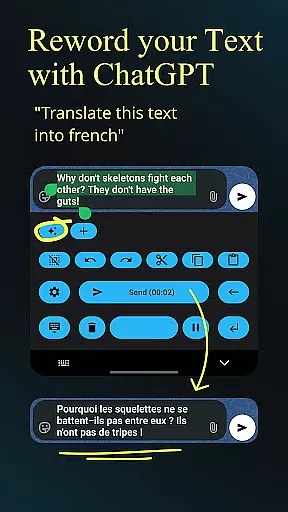
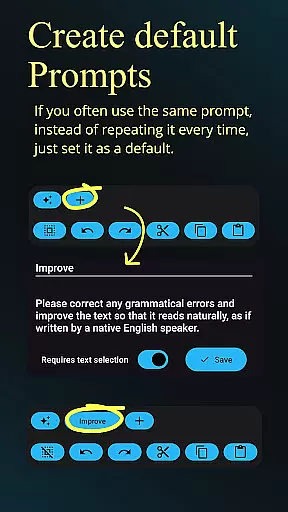
One of the key innovations is the integration of custom rewording instructions using advanced models like GPT-5. This feature allows users to implement translation, summarization, and style changes directly within their workflow. Additionally, the app supports automatic formatting of spoken commands, enabling users to create structured documents effortlessly. The ability to switch between various transcription models (Whisper, GPT-4o-transcribe) and providers (OpenAI, Groq) ensures optimal accuracy and flexibility.
Other notable features include comprehensive file transcription capabilities, Bluetooth microphone support, and customizable API server options. The app also offers practical functions like haptic feedback, quick keyboard switching, and both dark-mode and light-mode settings. These features collectively create a versatile typing environment that caters to different user preferences and working conditions, establishing Dictate Keyboard as a complete productivity solution.
Dictate Keyboard revolutionizes core task management by integrating advanced speech recognition technology into a user-friendly keyboard interface. This innovative approach allows users to convert spoken language into text with remarkable accuracy, supporting all common national languages.
The app's AI-driven system goes beyond basic transcription by intelligently adding punctuation and formatting spoken commands. Users can create new paragraphs, insert specific phrases, and even dictate complex instructions without manual corrections, significantly enhancing productivity.
What sets Dictate apart in task management is its seamless integration of multiple transcription models and providers. Users can switch between different recognition systems like Whisper or GPT-4o-transcribe, ensuring optimal performance across various tasks and environments.
This versatility extends to professional settings where users can transcribe audio/video files, record meetings using different microphones, and easily insert technical elements such as emojis and numbers. The result is a comprehensive task management solution that adapts to diverse work requirements while maintaining exceptional accuracy and efficiency.
Cross-device synchronization stands as a crucial feature in Dictate Keyboard, enabling users to maintain consistent productivity across multiple devices. The application achieves this through its sophisticated API integration system and custom server support.
During initial setup, users create an API key with OpenAI or Groq, establishing a reliable connection for data synchronization. This process ensures that all transcriptions, custom prompts, and user preferences are securely stored and accessible from any authorized device.
The synchronization system encompasses all essential elements including rewording instructions, formatting preferences, and custom themes. Whether switching between dark-mode and light-mode or accessing complex translation settings, users experience perfect consistency across their devices.
Furthermore, Dictate's open-source nature and GitHub availability guarantee transparency in how data is synchronized and managed. This approach not only builds trust but also allows advanced users to verify and potentially enhance the synchronization mechanisms, making it a robust solution for modern multi-device workflows.
Advanced speech recognition
Multi-language support
Automatic punctuation
Custom rewording options
Open-source flexibility
Requires API setup
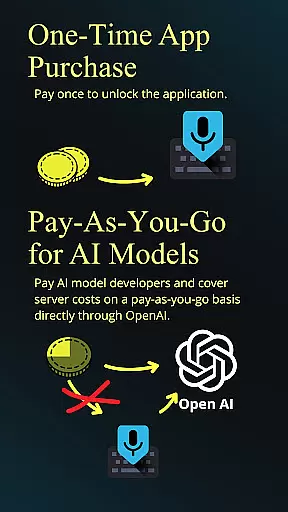
Incurs usage fees
Complex initial setup
Limited offline functionality
Dependent on third-party services

A customizable calendar for your Wear OS watch
 4.20
4.20
Protect and view your important info on your phone and tablet with eWallet®
4.80
PDF scanner & converter for files, photos, lottery, QR codes. One swipe away!
4.50
Multilingual translator for text, voice, and image translation!
4.90
Secure, open-source, SPICE and SSH Remote Desktop for QEMU KVM virtual machines
4.00
Docker, Kubernetes management over Portainer Mobile
4.40
Quickly and easily keep track of your work shifts
4.70
Secure your apps with lock screens, use custom themes and different features.
4.40
Okta MFA
4.70
A beautiful digital clock with autostart and many other functions
4.70
Translate text/voice/photos in 150+ languages. Offline & fast translator app.
4.50
Send files, sync SMS, notifications & clipboard across devices via local network
4.40
Pwnagotchi companion app
4.20
Font maker keyboard with your own handwriting
4.10
Cloud storage, automatic phone backup, and more.
4.10
Mega cloud explorer plugin for Solid Explorer
3.80
Make your handwriting beautiful, even more than pen on paper.
3.60
Simple and reliable communication between inmates, friends and family
3.20
IP Camera Viewer - Android TV : RTSP Surveillance camera viewer for Android TV
4.1



User Reviews