
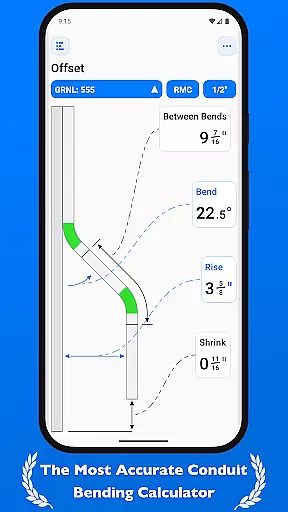
QuickBend is a cutting-edge conduit bending calculator app designed for precision and ease of use. It stands out by offering the most accurate measurements, accounting for the radius of the shoe and bender, conduit type, and size diameter. The app employs a centerline radius algorithm to ensure rigorous and field-tested calculations, making it an indispensable tool for electricians and DIY enthusiasts alike.
Beyond its core functionality, QuickBend provides an intuitive interface for inputting data, allowing users to toggle between inches and centimeters. Its innovative features include visual feedback through color-coded text, indicating the feasibility of a bend, and comprehensive support for various types of bends. Whether you're a seasoned professional or a novice, QuickBend streamlines your workflow and minimizes errors.
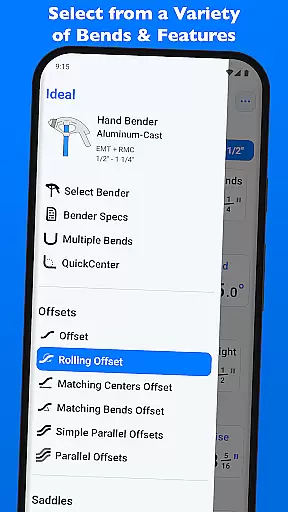
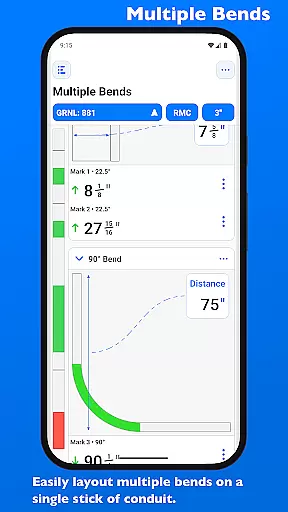
The app's versatility extends to managing multiple bends on a single conduit, with precise measurements for each mark. Users can easily switch between different benders and conduit types, all within a unified interface. With QuickBend, productivity is enhanced through features like pinned benders for quick access and detailed visualization of bender specifications, ensuring optimal performance in any scenario.
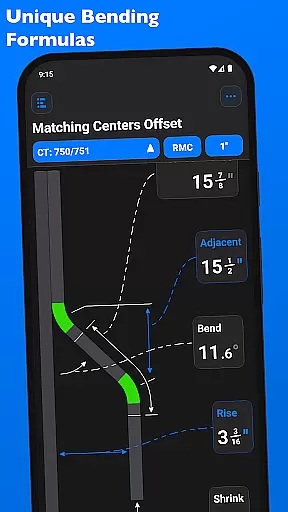
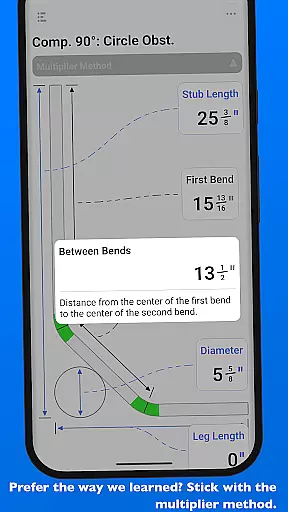
QuickBend distinguishes itself through a range of advanced features tailored for efficiency and accuracy. One standout aspect is its ability to calculate measurements using the centerline radius algorithm, rigorously tested for precision. This ensures that every bend, from simple offsets to complex compound 90° bends, is executed flawlessly.
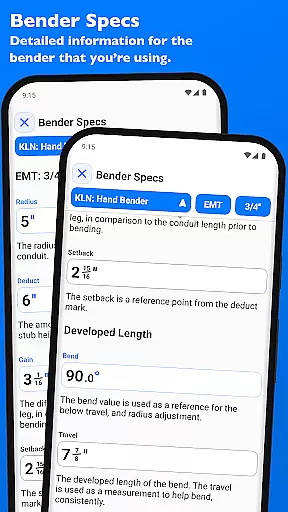
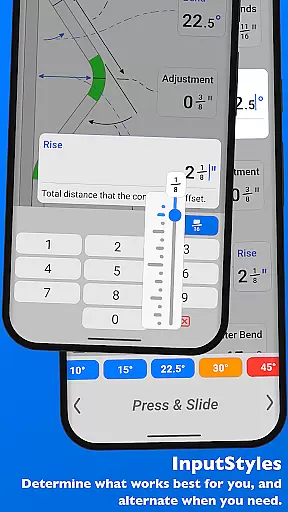
Another remarkable feature is the dual input styles, including a number pad and slider bar, catering to different user preferences. The app also incorporates QuickCheck, which provides real-time feedback on bend feasibility through color changes. Additionally, QuickBend supports extensive customization, allowing users to edit and view detailed bender specifications, such as centerline radius and setback adjustments.
Furthermore, QuickBend offers unparalleled flexibility in managing conduit projects. Users can layout multiple bends on a single conduit, with options to flip individual marks. The app simplifies navigation by consolidating all essential tools on one screen, while also enabling users to pin frequently used benders for rapid access. These features collectively enhance productivity and precision in conduit bending tasks.
QuickBend revolutionizes the way electricians and professionals manage their conduit bending tasks through its advanced calculation engine. This app is designed to streamline core task management by providing precise measurements that take into account various factors such as shoe radius, bender type, and conduit dimensions. The centerline radius algorithm ensures that every bend is calculated with meticulous accuracy, offering users reliable data for each project.
The app's interface allows seamless switching between different input methods, including a number pad and slider bar, catering to both quick inputs and detailed adjustments. With QuickBend, users can toggle between inches and centimeters, ensuring compatibility with diverse measurement standards. This flexibility in task management empowers users to execute their work efficiently while minimizing errors and saving valuable time on the job site.
Furthermore, QuickBend supports an extensive range of bends, from simple offsets to complex compound 90u00b0 bends. Each supported bend type comes with comprehensive documentation and visual feedback, enabling users to plan and execute even the most intricate conduit layouts with confidence. The ability to layout multiple bends on a single conduit and easily adjust individual marks demonstrates the app's commitment to optimizing task management for maximum productivity.
While QuickBend focuses primarily on precision and task management, it also offers reliable cross-device synchronization that enhances workflow continuity. Electricians and contractors often work across multiple devices, and QuickBend ensures that all crucial data and settings remain consistent regardless of which device is being used. This synchronization capability allows users to start a project on one device and seamlessly continue working on another without losing any progress or configuration settings.
The app maintains synchronization not only for basic preferences but also for detailed bender specifications and frequently used settings. Users can pin their most-used benders and have these selections available across all their devices. This feature saves significant time during project setup and execution, as professionals can quickly switch between different benders and conduit types without needing to reconfigure settings each time they change devices.
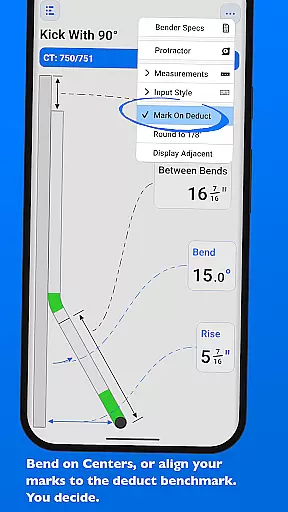
Additionally, QuickBend's synchronization extends to the 'Bender Specs' section, where detailed information about centerline radius, deduct, gain, and setback values are kept up-to-date across devices. This ensures that whether users are viewing or editing specifications on their phone, tablet, or other devices, they always have access to the most current and accurate information. Such comprehensive synchronization capabilities make QuickBend an indispensable tool for modern electrical work, where efficiency and accuracy are paramount.
Accurate calculations
User-friendly interface
Wide range of supported bends
Real-time feasibility feedback
Customizable bender specs
Premium version required
Steep learning curve
Limited free features
Occasional bugs
High system requirements

The Pro Version of Android's tiniest Notepad app. Just 0.3MB but feature-packed!
 4.60
4.60
A lightweight JSON & XML files creator, editor and viewer (Premium Version)
4.40
App lock - lock apps with fingerprint, password, pin or pattern, protect privacy
4.70
App Lock with fingerprint, password: Lock apps & hide photos with lock screens
4.60
Stay on top of your to-dos with Google Tasks, part of Google Workspace.
4.60
PDF scanner & converter for files, photos, lottery, QR codes. One swipe away!
4.50
Experience and share your SolidWorks designs on your Android® phone and tablet.
2.50
Share files & memories safely. Keep your photos and videos secure.
4.40
AT&T Internet customers can use this app to personalize their Wi-Fi network.
4.40
8 custom complications. Custom Time Fonts. Beautiful color schemes. A++ Design.
5.00
Multilingual translator for text, voice, and image translation!
4.90
Great calculator for Android named one of USA TODAY's "25 Essential Apps".
4.90
Mind Map and brainstorm, note taking and idea collection
4.80
Secure, fast, open-source, VNC and SSH Remote Desktop for Windows, Linux and Mac
4.70
Lightweight PDF, Word, Excel reader.
4.60
Translate text/voice/photos in 150+ languages. Offline & fast translator app.
4.50
Enjoy classic gameplay with customizable features and retro-style graphics.
4.30
The upgraded version of Name Wheel with AI and the power to add your own wheels.
4.2
A simple, portable logger for POTA, SOTA, Field Day, and more
4.4




User Reviews