
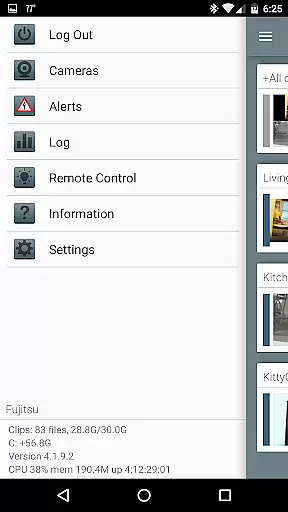
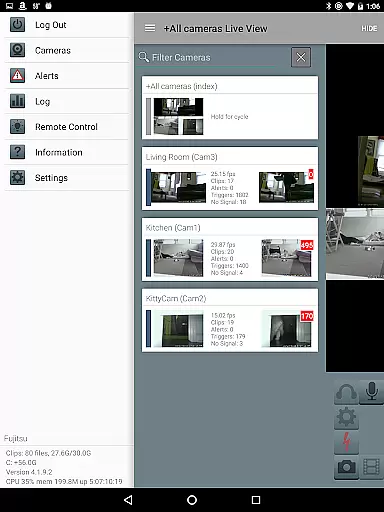
Blue Iris is a specialized client application designed to work seamlessly with the Blue Iris Windows PC software. This app serves as a centralized control point for your home camera network, allowing users to securely manage and monitor their surveillance system without exposing individual cameras directly to the Internet. By utilizing a secure, session-based protocol, it ensures that no sensitive information such as passwords are transmitted in plain text.
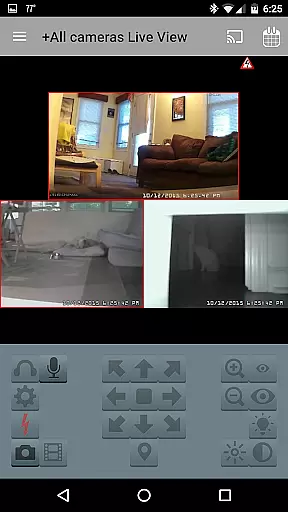
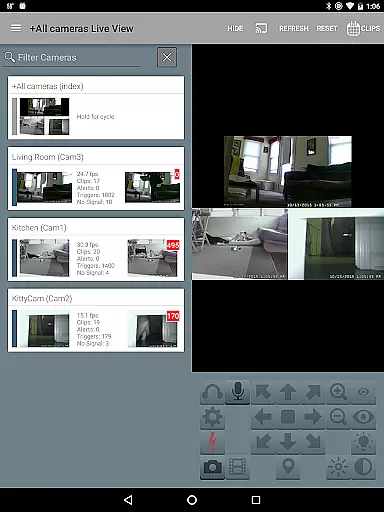
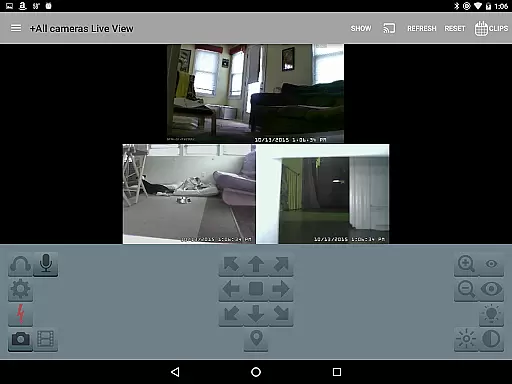
With Blue Iris, you can efficiently oversee multiple installations of the Blue Iris software, control various aspects like traffic signals and scheduling, and receive instant Android push alerts when any connected camera is triggered or critical status updates arise. The app supports fast H.264 streaming, PTZ (pan-tilt-zoom) controls, audio communication, and swift navigation through intuitive tap and swipe gestures. Additionally, users can review recordings stored on the Blue Iris PC at speeds up to 64x and selectively delete unnecessary footage, making it an indispensable tool for comprehensive home security management.
Blue Iris offers a robust set of features tailored for efficient and secure camera network management. One of its standout capabilities is the ability to manage multiple Blue Iris installations from a single interface, providing unparalleled convenience for users with extensive surveillance needs. The app allows precise control over various operational parameters such as traffic signal icons, scheduling, and profile selection, ensuring optimal performance and customization according to specific requirements.
In addition to its management capabilities, Blue Iris excels in real-time monitoring and interaction. Users can receive instant Android push notifications for triggered cameras or critical status messages, ensuring prompt responses to any incidents. The app supports high-speed H.264 streaming, delivering clear and smooth video feeds directly to your mobile device. Advanced functionalities include PTZ control, IR adjustments, and two-way audio communication for compatible cameras, enhancing the overall surveillance experience. Furthermore, the intuitive navigation system enables easy access to recorded footage, which can be reviewed at accelerated speeds and managed efficiently by selectively deleting unwanted recordings.
Blue Iris stands out in video format compatibility, ensuring users can work with a wide range of camera types and models. The app supports H.264 streaming, which is known for its efficiency and widespread adoption in the industry.
This compatibility allows users to connect and manage multiple cameras seamlessly, regardless of their brand or specifications. Whether it's a simple home security setup or a complex network of surveillance cameras, Blue Iris handles various formats effortlessly.
The benefit to users is significant; there's no need to worry about format mismatches or codec issues. This ensures that all your video streams are smooth, reliable, and most importantly, viewable across different devices without any hiccups.
While primarily a client for the Blue Iris Windows PC software, this app incorporates AI-powered editing features that enhance user interaction and control over their camera network. Through advanced algorithms, users can navigate cameras by simply tapping and swiping on their device screens.
Moreover, the app provides sophisticated tools for reviewing recordings stored on the Blue Iris PC. Users can play back videos at speeds up to 64x, allowing for quick scanning through footage to find specific events or moments.
These smart features not only save time but also improve the overall efficiency of managing and reviewing video content. With selective deletion options available directly from mobile devices, users have unprecedented flexibility in managing their recorded media.
User-friendly interface
Secure session-based protocol
Fast H.264 streaming
Comprehensive camera control
Instant push notifications
Requires Blue Iris PC software
No standalone functionality
Limited to Android devices
Dependent on network stability
Complex initial setup

VLC Remote lets you control your VLC Media Player on Mac, PC or Linux.
 4.60
4.60
1)AirPlay/DLNA Mirroring/Streaming, up to 4 connections; 2)Samba/NAS/DMS Player.
4.00
AirMirror Receiver - Screen mirroring/cast web videos to Android TV by AirPlay.
4.40
Seamlessly connect and control your smart devices, anytime, anywhere with ease.
4.60
GENRAL PRO - General Pro is the best video player that fully supports all formats.
4.70
Video Downloader, Multiple Resolution Options, Video Player
4.50
Video player with 4K & 1080P support, popup play, background play and subtitle.
4.20
VLC for Android is the best open source video and music player, fast and easy!
4.10
Manage your YouTube channel on the go
4.40
Video Trimmer, Video to MP3 Converter. Extract music from video, Easy & Fast.
4.80
All in one HD video downloader & player for multiple formats with full privacy
4.70
Screen recorder with audio to take live videos & Screenshot in high quality!
4.70
Cast Videos from Web Browser, IPTV to Roku, Chromecast, DLNA, Smart TV +more
4.60
Watch IPTV on your Android device
4.60
Download website videos fast&privacy
4.40
KMPlayer Plus (Divx Codec) officially support Divx codec.
4.30
Make your own Animations, Video and Photo Edits, Visual Effects, and more!
4.00
Cast to Smart TV, Fire TV. Cast video, photo - Fast & Stable!
3.90
Play and download HD videos from all sources — fast, simple, and all-in-one.
4.4





User Reviews