
KYOTO Player is a versatile video player app designed for seamless playback of various online video formats. Supporting an extensive range of file types including MP4, HLS, DASH, and more, it ensures smooth streaming without compatibility issues. Whether you're watching movies or listening to music, this player provides a reliable solution across multiple platforms.
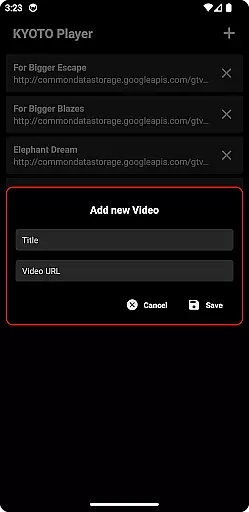
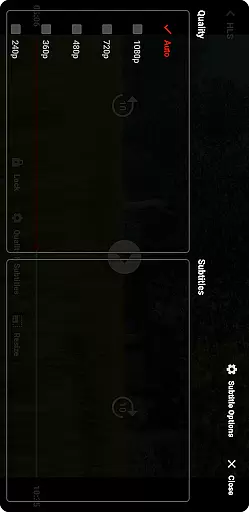
The application stands out with its user-friendly interface and efficient performance. It allows users to enjoy high-quality video playback while maintaining ease of use. With support for subtitles and customizable playback settings, KYOTO Player caters to diverse viewing preferences, making it ideal for both casual viewers and tech-savvy users.
One of the standout features of KYOTO Player is its broad format support, accommodating over ten different file types such as MP4, WebM, MKV, and others. This versatility eliminates the need for additional codecs or converters, streamlining the media consumption process. Additionally, the app supports audio formats like MP3, OGG, and WAV, enhancing its multimedia capabilities.
Beyond basic playback, KYOTO Player offers advanced functionalities including subtitle support, adjustable playback speeds, and customizable equalizer settings. These features empower users to tailor their viewing experience according to personal preferences. Furthermore, the app's intuitive design ensures that even novice users can navigate and utilize these powerful tools effectively.
Video format compatibility is a crucial feature for any video player application. KYOTO Player excels in this area by supporting an extensive range of video formats including MP4, HLS, DASH, MP3, WebM, MKV, OGG, WAV, MPEG-TS, MPEG-PS, FLV, and more.
The ability to play such a wide variety of formats ensures that users can enjoy their media content without worrying about format restrictions. This flexibility makes KYOTO Player suitable for diverse user needs, whether they are watching casual videos or handling professional media files.
By incorporating advanced decoding technologies, KYOTO Player guarantees smooth playback across all supported formats. The app's robust architecture ensures minimal buffering times and optimal resource usage, providing an uninterrupted viewing experience.
Moreover, regular updates to the player ensure that it stays current with emerging video standards and codecs. This commitment to compatibility means users can rely on KYOTO Player to handle new and evolving media formats as they become available.
While primarily a video player, KYOTO Player also offers AI-powered editing features that enhance the user's interaction with their media. These intelligent tools allow users to perform basic editing tasks like trimming, cropping, and adjusting video parameters with remarkable ease and precision.
The AI algorithms integrated into KYOTO Player analyze video content to suggest optimal editing points and effects. This not only simplifies the editing process but also helps users achieve professional-looking results without requiring extensive technical knowledge.
In addition to automated suggestions, KYOTO Player provides manual controls for users who prefer a hands-on approach. This combination of AI assistance and manual editing capabilities caters to both novice and experienced editors, making the app versatile and user-friendly.
Furthermore, these AI-powered features are continuously improved through machine learning, ensuring that the editing tools become smarter and more intuitive over time. This dedication to innovation positions KYOTO Player as a comprehensive solution for both video playback and light editing needs.
User-friendly interface
Wide format compatibility
Customizable playback options
Subtitle support
Reliable streaming performance
Limited advanced editing tools
No built-in cloud storage
Occasional buffering on slow networks
Basic audio effects only
Ads in free version

The smartest M3U IPTV Player your playlists have ever seen.
 4.3
4.3
Connect 2 UVC devices for recording and broadcast video/audio stream
3.90
Capture images & record videos for USB Camera, Webcam, Microscopes, Endoscopes
3.80
KMPlayer Plus (Divx Codec) officially support Divx codec.
4.30
Pro video editor app for Instagram, edit video with song, AI, effect & slowmo.
4.80
GENRAL PRO - General Pro is the best video player that fully supports all formats.
4.70
Browser + Remote for Roku to stream webvideos, online movies and livestreams
4.60
Powerful video player with advanced hardware acceleration and subtitle supports
4.20
Viddo: Generate Action Figure, AI Anime, AI kiss, AI hug Video from image & text
4.40
An easy-to-use and all-round screen recorder with audio
4.80
Flud is a simple and beautiful BitTorrent client for Android.
4.80
AI Video Editor with Music, Filter, Slideshow, Effect, Merge & Trim Video.
4.80
Cast Videos from Web Browser, IPTV to Roku, Chromecast, DLNA, Smart TV +more
4.60
Search & download videos from net with all video downloader, auto-detect & safe.
4.60
Video player, file manager for all formats, 4K/HD media player supports subtitle
4.30
Create & edit videos with AI
4.30
Turn your phone into a wireless camera!
4.20
Fast private browser with secure, seamless access & supported video downloads!
4.00
A full editing room to accompany your Insta360 cameras and handheld gimbals.
3.30









User Reviews